> ## Documentation Index
> Fetch the complete documentation index at: https://docs.flashcat.cloud/llms.txt
> Use this file to discover all available pages before exploring further.
# Permission Design
> Learn about Flashduty's role-based (RBAC) functional permissions and team-based data permissions design
Flashduty uses two types of permissions: **functional permissions** and **data permissions**, which work together in different feature scenarios.
You must have both **functional permissions** and **data permissions** to operate on certain data objects. Functional permissions are a prerequisite, determining whether you can perform a certain type of operation; data permissions further define the scope of data you can operate on.
## Functional Permissions
Functional permissions, also known as operational permissions, determine which system features or operations a user can access. This includes: whether APIs can be called, whether buttons are clickable, and whether pages and menus are visible.
Flashduty **controls functional permissions based on roles (RBAC)**, with permissions divided by modules for fine-grained management. The system provides the following preset roles (you can also create custom roles):
### Preset Roles
Has all permissions. Suitable for core members who need complete management capabilities. The Admin permission bitmap queries `account_id IN (0, current account ID)` with no upper bound on permission IDs, so it **automatically includes** every custom menu visit permission for that account — no explicit role binding required.
Has all **system** permissions except "Payment Center", "Members Manage", "Roles Manage", and "SSO Manage". Suitable for members handling daily operations work. The Responder query adds an `id < 100000` filter. Custom menu permission IDs are Snowflake-generated (far above 100000), so Responder does **not** automatically inherit any custom menu access — each menu must be explicitly bound to this role via the menu's `role_ids` configuration.
Has most read-only **system** permissions except "Audit" and "Onboarding". Suitable for members who only need to view data. Like Responder, Viewer is also subject to the `id < 100000` filter and does **not** automatically inherit custom menu access — explicit role binding is required per menu.
The **Responder** role does not include member management and role management permissions. To manage team members or assign roles, use the **Admin** role.
### Permission List
The system divides permissions by product scope, with each permission point having **Read** and **Manage** types. Permissions are grouped and displayed under the following product scopes, each with a corresponding icon:
* **Platform**: Organization management, payment center, and other foundational platform permissions
* **On-call**: Incident response, configuration management, status pages, and other on-call related permissions
* **RUM**: Frontend monitoring related permissions
* **Monitors**: Monitoring and alerting related permissions
* **Custom menu**: Account-level dynamic permission group; each configured custom menu becomes a permission point
When a permission point has both **Read** and **Manage** types, granting **Manage** permission automatically includes the corresponding **Read** permission — no need to select it separately.
#### System vs. account-level dynamic permissions
Flashduty's permission points fall into two categories:
* **System permissions**: Defined by Flashduty and identical across all accounts. They cover the built-in modules: Platform, On-call, RUM, Monitors.
* **Account-level dynamic permissions**: Generated from resources configured by the current account, and only visible within that account. The custom menu visit permissions are the canonical example — every custom menu the account adds spawns a matching permission point.
The role configuration API returns the following fields on each permission object so you can tell the two apart:
| Field | Description |
| ------------ | --------------------------------------------------------------------------------------------------------------- |
| `account_id` | `0` for system permissions; non-zero for account-level dynamic permissions (the value is the owning account ID) |
| `source` | `system` for system permissions; `account` for account-level dynamic permissions |
| `source_ref` | Source identifier for account-level dynamic permissions. For custom menu, this is the `menu_id` |
#### Custom menu permission group
Custom menu is a standalone permission scope, displayed alongside Platform, On-call, RUM, and Monitors. The group is rendered as a **flat list** — it is not further split into Read / Manage subclasses. Every custom menu configured under the account adds one permission point to this group:
* **Naming**: `customMenu:visit:`, where `` is the unique identifier of the custom menu.
* **Effect**: Members granted this permission can see and visit the corresponding custom menu in the navigation; without it, the menu is hidden.
* **Dynamic behavior**: When a custom menu is deleted, the matching permission point disappears. When a custom menu is added, re-enter role editing to grant it to the relevant roles.
**Custom menu permissions follow different inheritance rules depending on the preset role:**
* **Admin**: Automatically inherits every custom menu visit permission in the account — no additional configuration needed.
* **Responder / Viewer**: Do **not** automatically inherit custom menu permissions. These two preset roles build their permission bitmaps from a query filtered by `id < 100000`, which are the system-defined permission IDs. Custom menu permission IDs are Snowflake-generated and are always far above that threshold, so they are excluded. To allow a Responder or Viewer member to see a specific custom menu, you must explicitly add the corresponding role in that menu's role binding configuration (`role_ids` field).
* **Custom roles**: Also do not automatically inherit custom menu permissions; explicit binding per menu is required.
For creating and managing custom menus themselves, use **Platform Management → Custom Menu**; this section only documents the permission semantics.
| Permission | Type | Description |
| ------------------- | ------ | --------------------------------------------------------------- |
| **Members Manage** | Manage | Invite and remove members, grant and revoke member roles |
| **Roles Manage** | Manage | Create, edit and delete roles, manage permissions within a role |
| **Teams Manage** | Manage | Create, edit and delete teams, manage team members |
| **SSO Read** | Read | View single sign-on configuration information |
| **SSO Manage** | Manage | Enable or disable single sign-on and modify its configuration |
| **Audit Read** | Read | Retrieve and read operation audit logs |
| **API Keys Read** | Read | View account API keys |
| **API Keys Manage** | Manage | Create, view, modify and delete account API keys |
| Permission | Type | Description |
| ------------------ | ------ | ----------------------------------------------------------------------------------------------- |
| **Payment Read** | Read | View bills, subscription information, consumption records and other payment-related information |
| **Payment Manage** | Manage | Manage subscriptions, recharge, invoicing and other payment center operations |
| Permission | Type | Description |
| ----------------------- | ------ | ----------------------------------------------------------------------------------------------------------------------------------------- |
| **Channels Read** | Read | View workspace list, members, messages and other information. You must also have the corresponding data permissions for the channel |
| **Channels Manage** | Manage | Create, edit and delete channel, manage members and configurations. You must also have the corresponding data permissions for the channel |
| **Incidents Read** | Read | View incident list, details, timeline and other information |
| **Incidents Manage** | Manage | Create, edit, handle and close incidents, manage incident response processes |
| **Integrations Read** | Read | View configured integration list and integration details |
| **Integrations Manage** | Manage | Add, configure, test and delete integrations. You must also have the corresponding data permissions for the integration |
| **Analytics Read** | Read | View incident response, system health and other analytics reports and statistics |
| Permission | Type | Description |
| ------------------------ | ------ | ------------------------------------------------------------------------------------------------------------------------------------------------- |
| **Custom Fields Read** | Read | View custom field configurations and field definitions |
| **Custom Fields Manage** | Manage | Create, edit and delete custom fields, configure field types and validation rules |
| **Schedules Read** | Read | View on-call schedules, rotation rules and on-call personnel information |
| **Schedules Manage** | Manage | Create, edit and delete on-call schedules, configure rotation rules and override periods |
| **Calendars Read** | Read | View service calendars, holiday schedules and special time period configurations |
| **Calendars Manage** | Manage | Create, edit and delete service calendars, configure holidays and working days |
| **Templates Read** | Read | View notification templates, incident templates and other template configurations |
| **Templates Manage** | Manage | Create, edit and delete templates, customize template content and formats. You must also have the corresponding data permissions for the template |
| **Mappings Read** | Read | View data mapping rules and mapping relationship configurations |
| **Mappings Manage** | Manage | Create, edit and delete mapping rules etc. You must also have the corresponding data permissions for the mapping |
| Permission | Type | Description |
| ------------------------------ | ------ | ------------------------------------------------------------------------------------ |
| **Status Pages Read** | Read | View status page configuration, service status and historical events |
| **Status Pages Manage** | Manage | Create, edit and publish status pages, manage service components and events |
| **Status Pages Events Manage** | Manage | Publish, edit and delete events in status page, including incidents and maintenances |
| Permission | Type | Description |
| --------------------------- | ------ | -------------------------------------- |
| **Monits Overview Read** | Read | View monitoring overview etc. |
| **Alerting Rules Read** | Read | View monitoring alarm rules etc. |
| **Alerting Rules Manage** | Manage | Manage monitoring alarm rules etc. |
| **Rule Repository Read** | Read | View monitoring store etc. |
| **Rule Repository Manage** | Manage | Manage monitoring store etc. |
| **Node Permissions Read** | Read | View monitoring node permission etc. |
| **Node Permissions Manage** | Manage | Manage monitoring node permission etc. |
| **Datasources Read** | Read | View monitoring datasource etc. |
| **Datasources Manage** | Manage | Manage monitoring datasource etc. |
| **Alerting Engines Read** | Read | View monitoring engine etc. |
| **Alerting Engines Manage** | Manage | Manage monitoring engine etc. |
| Permission | Type | Description |
| ------------------------- | ------ | ------------------------------------------------------------------------------------------------- |
| **Applications Manage** | Manage | Create, configure and manage frontend monitoring apps, set sampling rules and alert policies etc. |
| **Performance Read** | Read | View frontend performance monitoring issues etc. |
| **Error Tracking Read** | Read | View frontend issues etc. |
| **Session Explorer Read** | Read | View event details etc. |
| **Session Replay Read** | Read | View frontend monitoring session replay etc. |
| Permission | Type | Description |
| ------------------- | ---- | ---------------------------------------------------------------------------------------------------------------------------------- |
| **Onboarding Read** | Read | Viewing onboarding information requires specific permissions for dependent teams, channels, incidents, schedules, and integrations |
### Custom Roles
In addition to preset roles, you can create custom roles for more granular permission control.
**Configuration path**: Platform Management → Role Management
Go to the role management page and click **Create Role**, then fill in the role name and description. You can also quickly create a role by copying an existing one.
On the role detail page, click the **edit icon (pen icon)** next to the role name or description to edit them inline. Changes are saved automatically.
On the role detail page under the **Permission List** tab, click **Edit** to enter editing mode. In editing mode, you can batch select to grant or revoke multiple permission points at once, then click **Save** when done.
On the role detail page under the **Authorized Members** tab, click **Edit** to enter editing mode. Use batch selection to add or remove members for this role, then click **Save**.
* System preset roles (Admin, Responder, Viewer) cannot be modified or deleted
* Custom roles support editing, copying, enabling/disabling, and deletion
* A member can hold multiple roles simultaneously; their effective permissions are the union of all assigned roles
### Permission Matrix
| Permission Module | Admin | Responder | Viewer |
| --------------------------------------------------------------------------------------------------------- | :------------: | :-----------------------: | :-----------------------: |
| **Members Manage** | ✔️ | | |
| **Roles Manage** | ✔️ | | |
| **Teams Manage** | ✔️ | ✔️ | |
| **SSO** | ✔️ | | Read |
| **Audit** | ✔️ | ✔️ | |
| **API Keys** | ✔️ | ✔️ | |
| **Payment** | ✔️ | | Read |
| **Channels** | ✔️ | ✔️ | Read |
| **Incidents** | ✔️ | ✔️ | Read |
| **Integrations** | ✔️ | ✔️ | Read |
| **Analytics** | ✔️ | ✔️ | Read |
| **Configuration** (Custom Fields, Schedules, Calendars, Templates, Mappings) | ✔️ | ✔️ | Read |
| **Status Pages** | ✔️ | ✔️ | Read |
| **Monitors** (Overview, Alerting Rules, Rule Repository, Node Permissions, Datasources, Alerting Engines) | ✔️ | ✔️ | Read |
| **RUM** (Applications, Performance, Error Tracking, Session Explorer, Session Replay) | ✔️ | ✔️ | Read |
| **Onboarding** | ✔️ | ✔️ | |
| **Custom Menu** (each menu granted independently) | Auto-inherited | Explicit binding required | Explicit binding required |
## Data Permissions
Data permissions, also known as access permissions, control the scope of data a user can access or view.
**Functional permissions are a prerequisite for data permissions.** You must first have the corresponding functional permissions for data permissions to take effect. For example: a member with the **Viewer** role belongs to Team A, and a channel belongs to Team A and is set to private. Although the member has data permissions to access this channel, since **Viewer** does not have channel management functional permissions, they can only view but not edit.
Flashduty **controls data permissions based on teams**, applied in the following scenarios:
| Scenario | Permission Description |
| -------------------------- | ------------------------------------------------------------------------------------------------------------------------------------------------ |
| **Team Management** | Creator, owner account, and team members can modify team information and manage team members |
| **Channels** | Creator, owner account, and responsible team members can modify channel basic information, noise reduction configuration, escalation rules, etc. |
| **Schedule Management** | Creator, owner account, and responsible team members can modify schedule basic information, rotation rules, etc. |
| **Template Management** | Creator, owner account, and responsible team members can modify template basic information, channel template configurations, etc. |
| **Service Calendar** | Creator, owner account, and responsible team members can modify calendar basic information, holiday settings, etc. |
| **Integration Management** | Creator, owner account, and responsible team members can manage integration configurations |
| **Mapping Rules** | Creator, owner account, and responsible team members can manage mapping rule configurations |
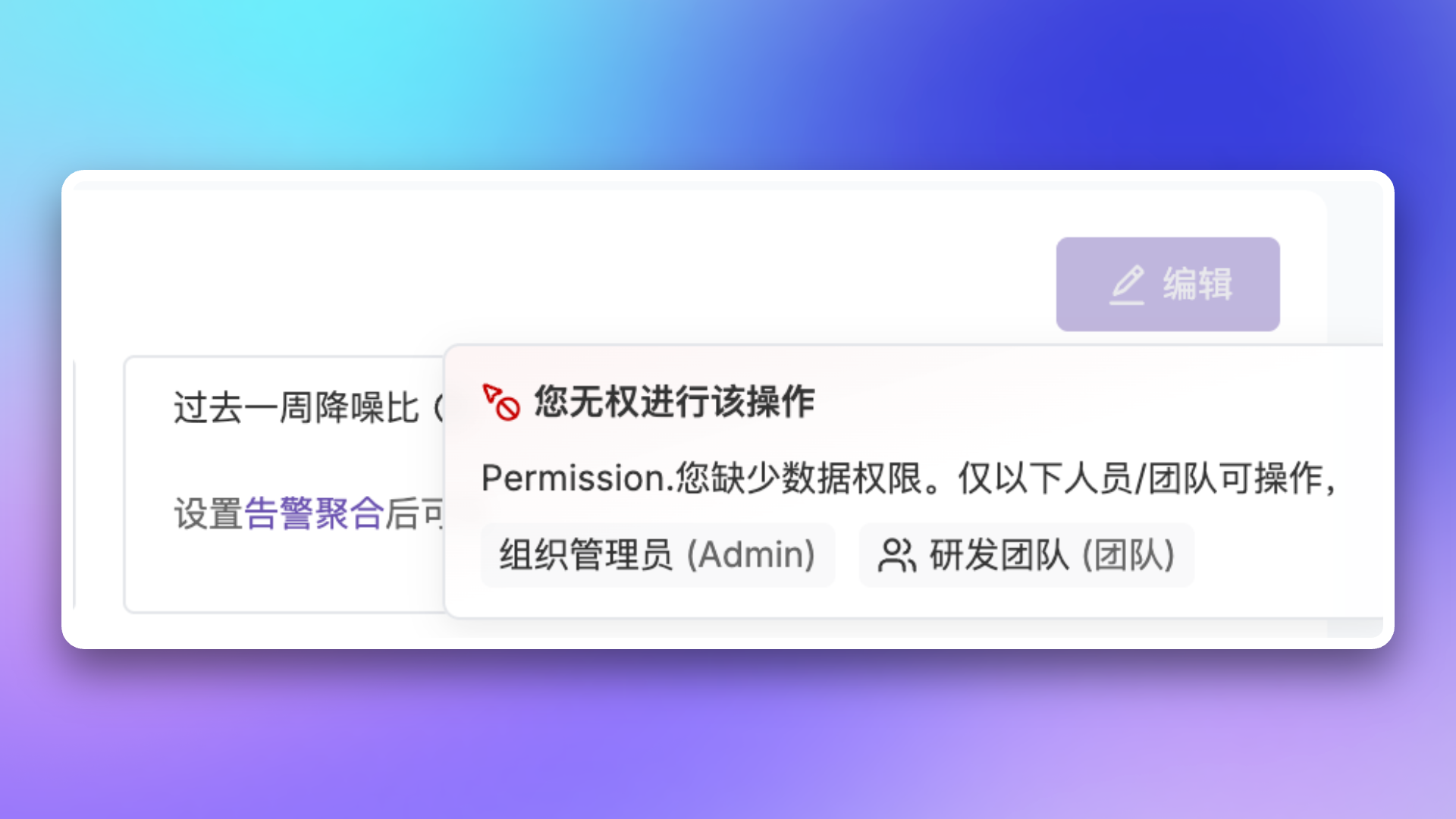
When you don't have data permissions for a resource, the system will display the following message:
 ## Legacy Role Migration
The following legacy preset roles were deprecated on **January 30, 2026**, and the system has automatically completed the migration.
### Legacy Role Description
| Role | Description |
| --------------- | ---------------------------------------------------------------------------------------------------------- |
| `Account.Admin` | Account Administrator, originally had all operational permissions |
| `Fin.Admin` | Financial Administrator, originally had payment center ordering permissions |
| `Tech.Admin` | Technical Administrator, originally had access control and audit permissions (including member management) |
### Migration Mapping
| Original Role | New Role | Description |
| --------------- | ------------- | ------------------------------------------------ |
| `Account.Admin` | **Admin** | Permissions unchanged |
| `Fin.Admin` | **Admin** | Permissions elevated |
| `Tech.Admin` | **Responder** | Member management permissions removed |
| No role | **Responder** | Automatically granted |
| Custom role | Unchanged | May lose some Monitors permissions, please check |
### Compatibility Notes
The following scenarios will automatically grant the **Viewer** role to ensure members have basic access permissions:
* When [inviting new members via Open API](/en/api-reference/platform/members/member-invite) without specifying a role
* When automatically creating members through **Single Sign-On (SSO)** without specifying a role
**Compatibility period ends: June 30, 2026**
After this date, API requests without specifying a role will return an error. Please complete the adaptation in advance.
Users with custom roles should check their permission configuration after the upgrade to ensure it meets expectations.
## Related Topics
Learn about team and member management
Configure SSO for unified identity authentication
## Legacy Role Migration
The following legacy preset roles were deprecated on **January 30, 2026**, and the system has automatically completed the migration.
### Legacy Role Description
| Role | Description |
| --------------- | ---------------------------------------------------------------------------------------------------------- |
| `Account.Admin` | Account Administrator, originally had all operational permissions |
| `Fin.Admin` | Financial Administrator, originally had payment center ordering permissions |
| `Tech.Admin` | Technical Administrator, originally had access control and audit permissions (including member management) |
### Migration Mapping
| Original Role | New Role | Description |
| --------------- | ------------- | ------------------------------------------------ |
| `Account.Admin` | **Admin** | Permissions unchanged |
| `Fin.Admin` | **Admin** | Permissions elevated |
| `Tech.Admin` | **Responder** | Member management permissions removed |
| No role | **Responder** | Automatically granted |
| Custom role | Unchanged | May lose some Monitors permissions, please check |
### Compatibility Notes
The following scenarios will automatically grant the **Viewer** role to ensure members have basic access permissions:
* When [inviting new members via Open API](/en/api-reference/platform/members/member-invite) without specifying a role
* When automatically creating members through **Single Sign-On (SSO)** without specifying a role
**Compatibility period ends: June 30, 2026**
After this date, API requests without specifying a role will return an error. Please complete the adaptation in advance.
Users with custom roles should check their permission configuration after the upgrade to ensure it meets expectations.
## Related Topics
Learn about team and member management
Configure SSO for unified identity authentication