> ## Documentation Index
> Fetch the complete documentation index at: https://docs.flashcat.cloud/llms.txt
> Use this file to discover all available pages before exploring further.
# Privacy Protection
> Master Flashduty RUM's session replay feature to quickly locate issues and optimize user experience by recreating user operation paths.
To meet privacy requirements for different scenarios, the session replay feature has built-in flexible privacy protection strategies. By configuring the `defaultPrivacyLevel` field, developers can control data collection sensitivity, supporting modes from displaying all text (except passwords) to completely hiding page text, ensuring user data security and compliance.
Password type inputs are sensitive information and **will not be collected in any scenario**.
## Privacy Policies
Configure `defaultPrivacyLevel: "mask"` to completely hide all text content on the page, preserving only operation behavior and page structure. Suitable for scenarios with high data privacy requirements.
```javascript theme={null}
window.FC_RUM.init({
applicationId: "YOUR_APPLICATION_ID",
clientToken: "YOUR_CLIENT_TOKEN",
// ...
sessionReplaySampleRate: 10,
defaultPrivacyLevel: "mask",
// ...
});
```
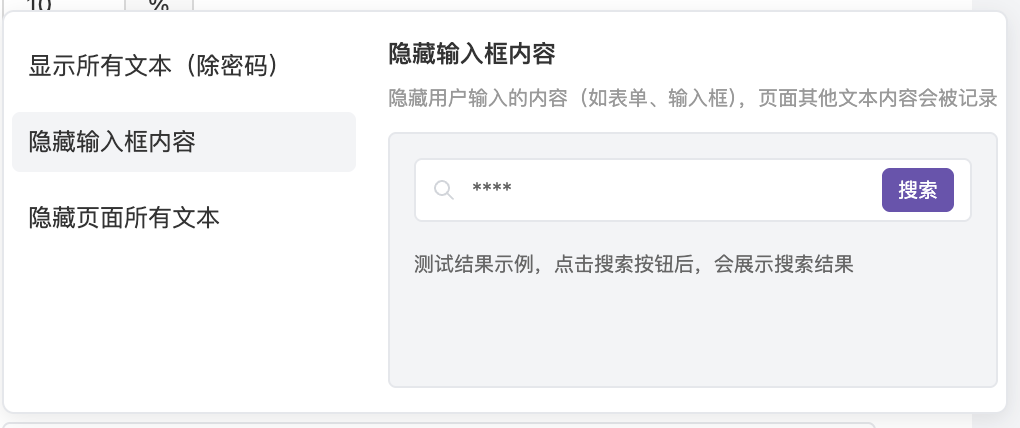
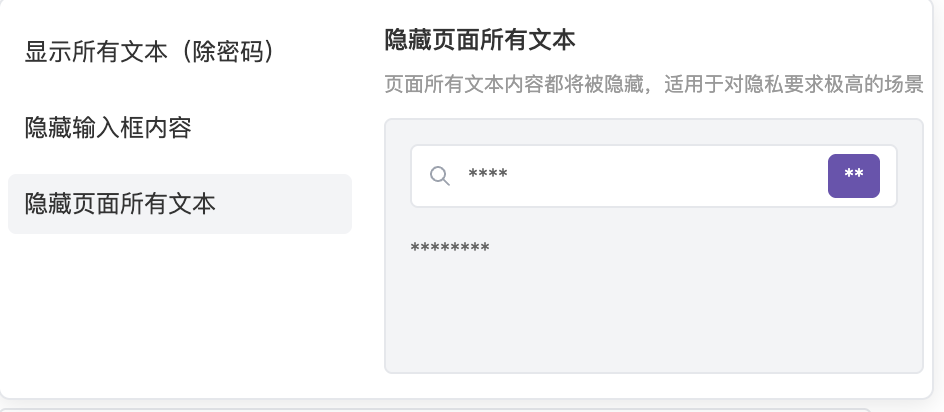 Configure `defaultPrivacyLevel: "mask-user-input"` to hide content in user input fields (such as text inputs, select boxes, etc.), but preserve other page text. Suitable for scenarios requiring protection of user input privacy.
```javascript theme={null}
window.FC_RUM.init({
applicationId: "YOUR_APPLICATION_ID",
clientToken: "YOUR_CLIENT_TOKEN",
// ...
sessionReplaySampleRate: 10,
defaultPrivacyLevel: "mask-user-input",
// ...
});
```
Configure `defaultPrivacyLevel: "mask-user-input"` to hide content in user input fields (such as text inputs, select boxes, etc.), but preserve other page text. Suitable for scenarios requiring protection of user input privacy.
```javascript theme={null}
window.FC_RUM.init({
applicationId: "YOUR_APPLICATION_ID",
clientToken: "YOUR_CLIENT_TOKEN",
// ...
sessionReplaySampleRate: 10,
defaultPrivacyLevel: "mask-user-input",
// ...
});
```
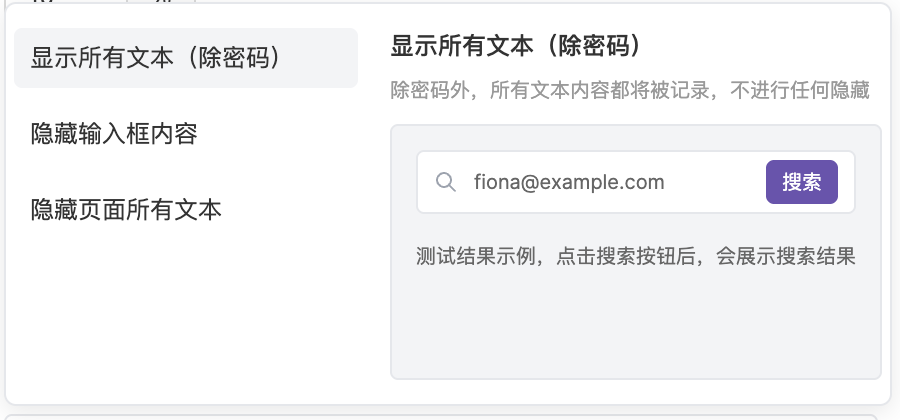
 Configure `defaultPrivacyLevel: "allow"` to collect all text content on the page except password fields. Suitable for scenarios requiring complete user interaction details.
```javascript theme={null}
window.FC_RUM.init({
applicationId: "YOUR_APPLICATION_ID",
clientToken: "YOUR_CLIENT_TOKEN",
// ...
sessionReplaySampleRate: 10,
defaultPrivacyLevel: "allow",
// ...
});
```
Configure `defaultPrivacyLevel: "allow"` to collect all text content on the page except password fields. Suitable for scenarios requiring complete user interaction details.
```javascript theme={null}
window.FC_RUM.init({
applicationId: "YOUR_APPLICATION_ID",
clientToken: "YOUR_CLIENT_TOKEN",
// ...
sessionReplaySampleRate: 10,
defaultPrivacyLevel: "allow",
// ...
});
```
 ## Configuration Comparison
| Configuration Value | Page Text | Input Content | Password Fields | Applicable Scenarios |
| ------------------- | --------- | ------------- | --------------- | ---------------------------------- |
| `mask` | Hidden | Hidden | Hidden | High privacy requirement scenarios |
| `mask-user-input` | Shown | Hidden | Hidden | Protect user input |
| `allow` | Shown | Shown | Hidden | Complete interaction details |
## Configuration Comparison
| Configuration Value | Page Text | Input Content | Password Fields | Applicable Scenarios |
| ------------------- | --------- | ------------- | --------------- | ---------------------------------- |
| `mask` | Hidden | Hidden | Hidden | High privacy requirement scenarios |
| `mask-user-input` | Shown | Hidden | Hidden | Protect user input |
| `allow` | Shown | Shown | Hidden | Complete interaction details |