

Steps
Create Email Integration
You can obtain an email address through either of these two methods:Using Private Integration
Choose this simpler option when you don’t need to route alerts to different channels.Using Shared Integration
Choose this option when you need to route alerts to different channels based on the alert payload information.Customize Email Integration
Email Address
By default, the system generates a unique email address for you. You can modify it, but note that the email prefix must not contain uppercase letters (lowercase letters and digits are recommended) and must remain unique within your account.Push Mode
By default, the system creates a new alert for every email, but you can switch the mode to:- Trigger or Update Alert Based on Email Subject: In this mode, when receiving a new email, the system searches for open alerts based on the email subject. If found, it updates the alert; otherwise, it triggers a new alert.
-
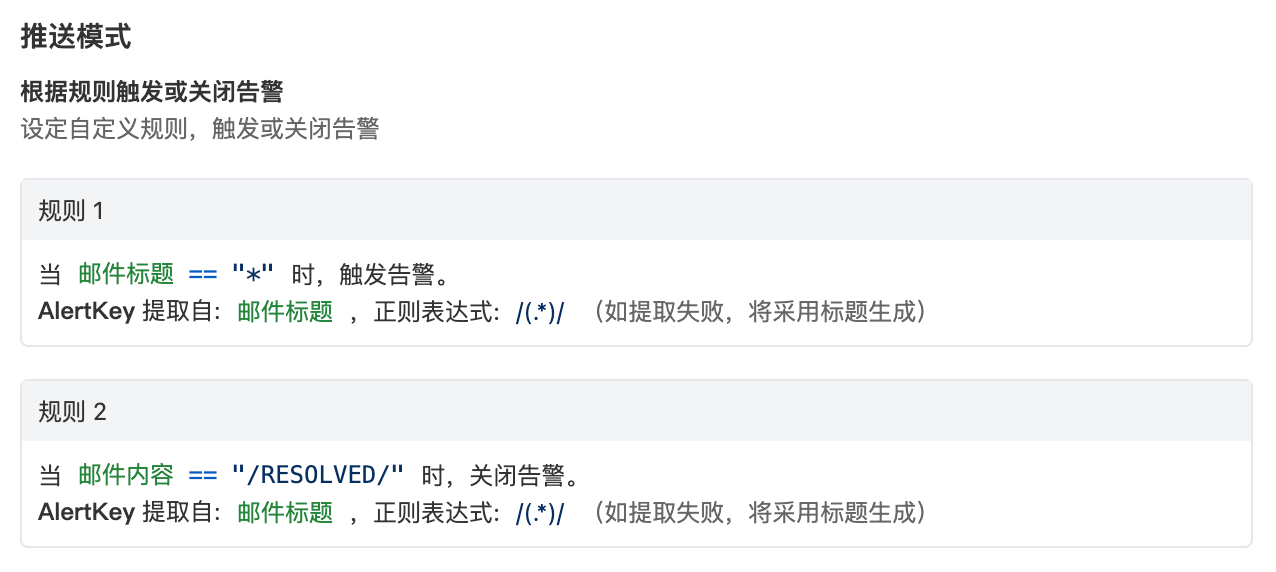
Trigger or Close Alert Based on Rules: In this mode, when receiving a new email, the system matches emails according to your rules and either triggers new alerts or closes existing ones based on the matches.
- You must fill in at least one trigger rule
- You must set regex extraction rules for Alert Key. The system uses this field to find historical alerts for updates or closure; if regex extraction fails, the system will use the email subject to generate an Alert Key to ensure alerts aren’t lost due to configuration errors
- You can choose whether to discard emails when no rules match
- Receive all emails, close the alert when the email content contains RESOLVED, otherwise trigger a new alert
- Extract Alert Key from email subject using the rule /(.*)/
Important Notes
- The system will reject emails larger than 5MB
- If the email text content exceeds 32KB, the system will truncate it and add a label in the incident details:
- If the email contains attachments, the system will discard them and add a label in the incident details:
- For new alerts triggered by email, the title is the email subject, and the description is the email content
- If you modify your account domain, this email address will also change, so remember to update the push URL
Severity Mapping
Currently, all alerts pushed to Flashduty through the email integration are set to Warning severity. However, you can customize the severity using the alert pipeline.