

- Alert Notifications: Deliver Issues as alert events to Flashduty channels, notifying responders through escalation rules
- Webhook Delivery: POST Issue alerts directly to your receiver, suitable for RUM-only private deployments without On-call or for custom notification pipelines
- Alert Grading: Customize alert priority based on error attributes such as user, page, or environment
- Data Filtering: Filter out noise data before Errors are aggregated into Issues, reducing unnecessary alerts
Enable Alerts
Configure Notification Rules
If you choose Flashduty channels, alert notification rules follow the escalation rules under the channel. You can set up responders for your team to assign alerts when they occur
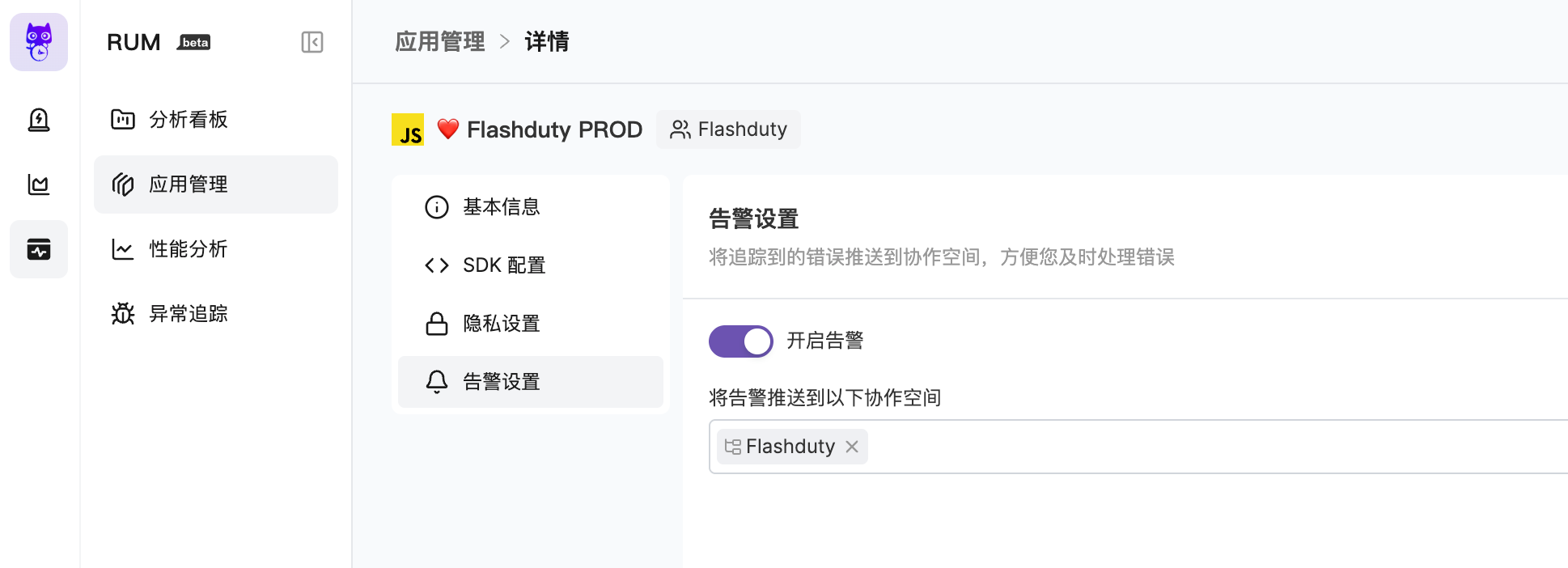
Delivery Modes
| Delivery Mode | Use Cases | Configuration Requirements | Downstream Handling |
|---|---|---|---|
| Flashduty channels | Incident collaboration, on-call dispatch, notification escalation, and Alert Pipeline processing inside Flashduty | Select one or more channels. If no channel is selected, alerts are not delivered | Issue alerts enter the selected channels and continue through integration config, noise reduction config, and escalation rules |
| Webhook | RUM-only private deployments, custom notification systems, or direct delivery to an external receiver | Enter a reachable Webhook URL. When alerts are enabled and Webhook is selected, the URL cannot be empty | RUM directly POSTs sample or real alert events to the URL. DingTalk, WeCom, and similar bot formats need your receiver to transform and forward the payload |
Alert Trigger Conditions
| Trigger Condition | Description |
|---|---|
| New Issue | An error event causes a new Issue to appear, triggering an alert event |
| Issue Update | Error events continue to merge into an unclosed Issue (For Review, Reviewed), and more than 24 hours have passed since the last alert event, a new alert event will be triggered |
| Issue Reopened | A new error merges into a closed Issue, causing the Issue to be reopened (regression) |
| Issue Priority Upgrade | When a higher-priority error event enters a lower-priority Issue, the Issue priority is automatically upgraded and a new alert event is triggered. For example, a P2 Issue receiving an error matching a P0 rule will be upgraded to P0 |
- An Issue triggers an alert event. The actual destination depends on the delivery mode selected in Alert Settings
- With Flashduty channel delivery, whether a notification is triggered depends on the channel’s integration config, noise reduction config, and escalation rules
- With Webhook delivery, RUM sends the event directly to the Webhook URL. Your receiver is responsible for later notification, payload transformation, and retry behavior
- When an Issue is closed, the system triggers a close-type alert event. If the alert is delivered through Flashduty channels, the associated incident may automatically recover
Alert Severity
Default Grading Rules
If no custom alert grading rules are configured, the severity of alert events triggered by Issues is automatically determined by the system:- Basic Judgment
- Scoring System
- Scoring Factors
| Condition | Severity |
|---|---|
| Issue has existed for more than 7 days | Info |
| Crash issue | Critical |
Custom Alert Grading
You can configure custom alert grading rules in “Alert Settings” to set alert priority (P0 / P1 / P2) based on error attributes, enabling more granular alert control. Custom grading rules are evaluated when an Error is reported, producing a “preset priority”. When the Error is aggregated into an Issue:- New Issue: The Issue priority is determined by the preset priority of the first Error
- Matching existing Issue: If the Error’s preset priority is higher, the Issue priority is automatically upgraded (never downgraded)
- No rule matched: Default priority P2 is used
| Element | Description |
|---|---|
| Rule Name | A name for easy identification and management |
| Match Conditions | Filter conditions based on Error attributes; multiple conditions within a rule use AND logic |
| Alert Level | Priority assigned on match: P0 (Critical) / P1 (Warning) / P2 (Info) |
Supported Match Fields
| Field | Description | Example |
|---|---|---|
User ID (error.usr_id) | User identifier that reported the error | vip_001 |
User Email (error.usr_email) | User email address | *@vip.com |
Page URL (error.view_url) | Full page URL where the error occurred | Contains /payment |
Error Type (error.error_type) | Error type classification | TypeError, SyntaxError |
Error Message (error.error_message) | Error description text | Contains Cannot read property |
Stack (error.error_stack) | Error stack trace | Contains at handleClick |
Environment (error.env) | Environment where the error occurred | production, staging |
Service (error.service) | Service the error belongs to | payment |
Version (error.version) | Application version | 1.2.0 |
Browser (error.browser_name) | Browser name | Chrome, Safari |
Browser Version (error.browser_version) | Browser version number | 120.0 |
Is Crash (error.is_crash) | Whether it’s a crash error | true |
Configuration Examples
VIP user errors — immediate alert
VIP user errors — immediate alert
Set the highest priority for VIP user errors to ensure immediate response:
- Match condition: User ID contains
vip - Alert level: P0 (Critical)
Payment page errors — prioritized handling
Payment page errors — prioritized handling
The payment page is a critical business flow; related errors need priority handling:
- Match condition: Page URL contains
/payment - Alert level: P1 (Warning)
Production crashes — immediate alert
Production crashes — immediate alert
Production crashes require immediate response:
- Match condition: Environment contains
production, AND Is Crash containstrue - Alert level: P0 (Critical)
Data Filtering
Data filtering allows you to filter out unwanted noise data before Errors are aggregated into Issues. Filtered Errors will not participate in Issue aggregation or trigger alerts. You can add filter rules in “Alert Settings”. Each rule can have multiple match conditions with AND logic within the same rule. Supported match fields are the same as Custom Alert Grading.| Scenario | Example Rule |
|---|---|
| Exclude third-party script errors | Error Stack contains cdn.third-party.com |
| Exclude known harmless errors | Error Message contains ResizeObserver loop |
| Exclude debug page errors | Page URL contains /debug |
Integration with Flashduty
RUM alerts work in deep collaboration with Flashduty, forming a complete alert processing chain:| Layer | Configuration Location | Core Capability | Use Cases |
|---|---|---|---|
| Data Filtering | RUM Alert Settings | Filter noise Errors | Permanently ignore third-party script errors, debug page errors, etc. |
| Alert Grading | RUM Alert Settings | Set priority based on Error attributes | VIP user alerts, critical page alerts, etc. |
| Alert Processing | Flashduty Integration Config | Title customization, priority adjustment, drop/suppression | Adjust level based on affected user count, suppress repeated alerts, etc. |
| Alert Dispatch | Flashduty Channel | Routing, on-call scheduling, notification channels | Dispatch to different teams, configure notification methods, etc. |
Further Reading
RUM Alert Noise Reduction
Typical scenario configurations to quickly reduce unnecessary alert noise
Alert Pipeline
Clean, transform, and filter alerts at the integration layer
Noise Reduction
Aggregate and suppress alerts at the channel level
Escalation Rules
Configure escalation rules to route alerts to the right responders