

Overview
A RUM application is a container for frontend performance monitoring data, used to collect, store, and analyze real user experience data from frontend applications. An application represents a monitored frontend project, which can be a website, mobile app, or single-page application. Each application has its own uniqueapplicationId and clientToken, used to identify data sources and ensure data security. After the application is created, you need to integrate the SDK into your frontend code to start data collection and monitoring.
Application Permissions
To meet the data security requirements of different business scenarios, RUM applications provide flexible access level settings:| Access Level | Visibility | Applicable Scenarios |
|---|---|---|
| Public | Visible to all users in the account, can view data and handle Issues | General business applications |
| Private | Only visible to creator, account administrator, and owner account | Sensitive business data |
In private applications, if other members need to view content, they can be temporarily authorized to access it by sharing the incident link.
Create Application
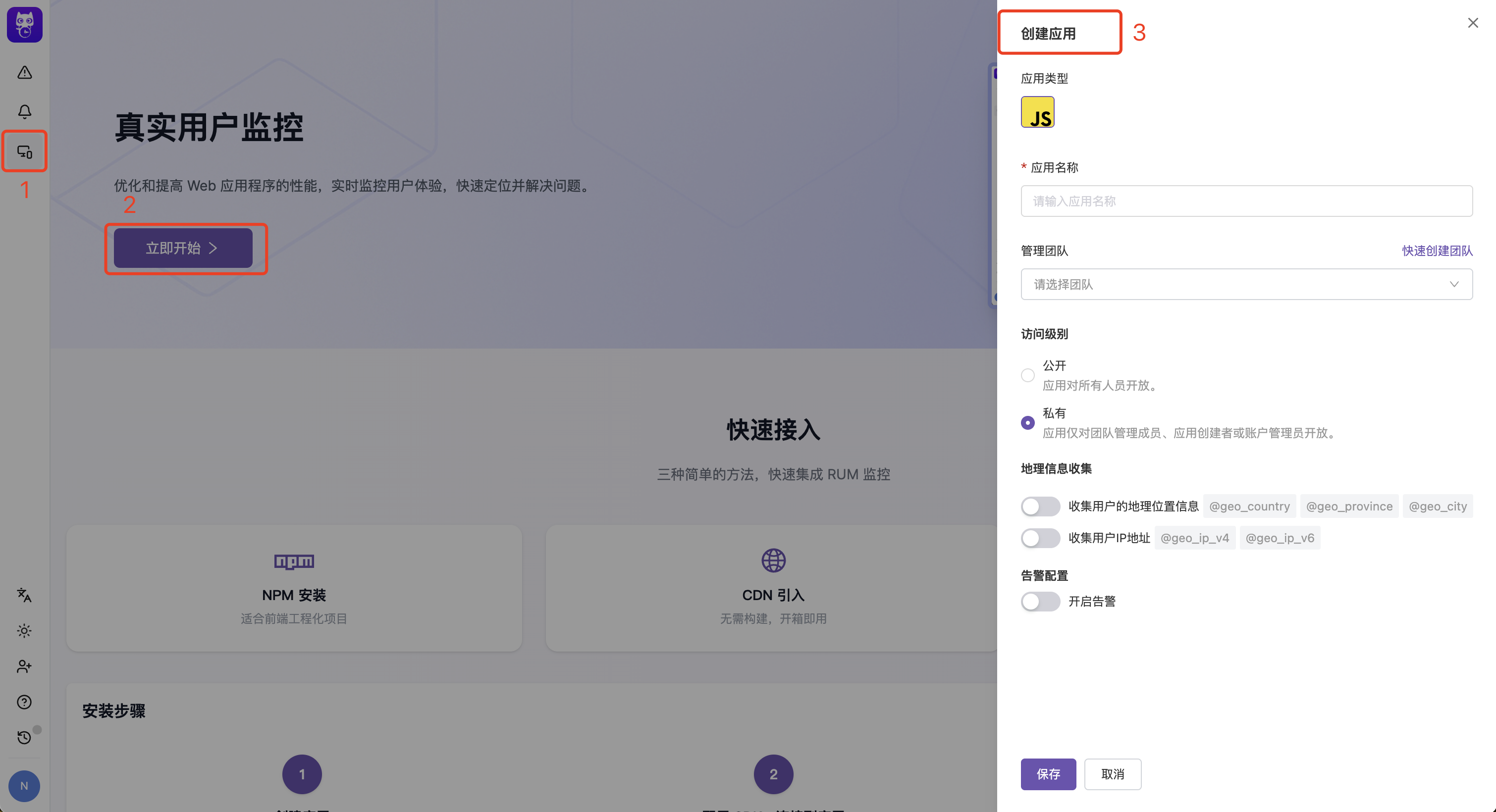
Select Application Type
Select the frontend technology type corresponding to the application, currently supporting JavaScript (JS), Android, iOS, and WeChat Mini Program.
Configure Geo-information
By default, automatic collection of user geo-location data is enabled. To disable automatic collection of client IP or geo-location data, turn off the geo-information collection switch.See Data Collection.
Configure Alerts
By default, alert notifications are automatically enabled to facilitate timely handling of errors.See Issue Alerts.
SDK Configuration
You can modify parameters and preview the initialization code in real-time in Application Configuration > SDK Configuration to quickly integrate the SDK. The console provides detailed integration guides for each platform:- JavaScript (Web): After configuring parameters like service name, preview the
flashcatRum.init()initialization code in real-time - Android: Shows complete integration steps including adding Gradle dependencies (
cloud.flashcat:dd-sdk-android-coreandcloud.flashcat:dd-sdk-android-rum), initializing the SDK inApplication.onCreate()with RUM enabled, and optional WebView tracking integration - iOS: Shows complete integration steps including adding Swift Package Manager dependency (
fc-sdk-ios, from version 0.3.0), initializing the SDK inAppDelegate.didFinishLaunchingWithOptionswith RUM enabled, and optional WebView tracking integration - WeChat Mini Program: Fill in
env,service,version, andsessionSampleRatein the form, and theflashcatRum.init()snippet built on@flashcatcloud/miniprogram-rumis generated and previewed in real time (see “WeChat Mini Program SDK Configuration Assistant” below)
applicationId and clientToken, so you can copy the code directly into your project.
Service Definition
A service is an independent, deployable code repository that maps to a set of pages.- Monolithic Application
- Micro-frontend/Multi-page Application
If your application is built as a whole, your RUM application only needs one service name.
WeChat Mini Program SDK Configuration Assistant
When the application type is WeChat Mini Program, Application Configuration > SDK Configuration displays a dedicated Mini Program integration wizard: fill in the form on the left and a ready-to-copy initialization snippet is generated on the right in real time.Form Fields
| Field | Description | Validation | Default |
|---|---|---|---|
env | Environment variable, e.g. prod, dev | Letters, digits, underscore only; up to 24 chars | — |
service | Service name; all events default to this tag | Letters, digits, underscore only; up to 24 chars | — |
version | Version number, useful for filtering during analysis | Letters, digits, . only; up to 24 chars | 1.0.0 |
sessionSampleRate | Session sample rate (percentage) | Integer in range 0–100 | 10 |
No save action is needed — the preview snippet updates as you type.
applicationId and clientToken are filled in automatically by the system; you do not need to set them by hand.Two-Step Integration
Add Dependency
Install the SDK in your Mini Program project and run the npm build through WeChat DevTools:
Link Integration
Link Integration lets you associate RUM events with external systems, such as distributed tracing platforms, log search, object storage that stores crash log packages, or internal troubleshooting systems. After you configure links, RUM generates jump links from the event type and event context and shows them as Related Links in event details. Link Integration is available from the Link Integration tab on the application details page and applies to every application type. Members with the RUM Application Update permission can add, edit, enable, disable, or delete link configurations.Built-in Tracing
The built-in Tracing card is the default Link Integration entry. It links thetrace_id on resource events to your backend tracing system.
Enter the jump link
In the Link Integration tab, find the Tracing card and enter the jump link for your tracing system. You can use the
${trace_id} variable in the link. RUM replaces it with the actual Trace ID from the resource event when it displays the link.For example: https://your-tracing-system.com/trace/${trace_id}Built-in Tracing only matches resource events, and it appears only when the event contains
trace_id. The jump link must start with http:// or https://.Add External Links
Besides built-in Tracing, you can add custom external links for different event types.Add a link
In the Link Integration tab, select Add external link, then enter the link name and redirect URL template.
Choose applicable event types
Choose the event types where this link should appear. The supported types are Crash, Error, View, Action, Resource, and Session.A crash is an error event: selecting Error matches both regular errors and crashes, while selecting Crash matches only crash events.
| Setting | Description | Rule |
|---|---|---|
| Link name | External system name shown in RUM event details | Required |
| Applicable event types | Controls which RUM events show the link | Select at least one event type |
| Redirect URL template | External system URL that can include ${variable} tokens | Must start with http:// or https:// |
| Per-link switch | Controls whether this external link is active | Disabled links are not shown |
Available Variables
Link Integration extracts variables from the current event context and substitutes them into the URL template.| Variable | Description | Common Event Scope |
|---|---|---|
${session_id} | Session ID | Session, View, Action, Error, Resource |
${view_id} | View ID | View, Action, Error, Resource |
${action_id} | Action ID | Action |
${error_id} | Error ID | Error, Crash |
${resource_id} | Resource ID | Resource |
${trace_id} | Trace ID | Resource, built-in Tracing |
${application_id} | RUM application ID | All events |
${service} | Service name | Events that collect service |
${version} | Version | Events that collect version |
${env} | Environment | Events that collect env |
${usr_id} | User ID | Events that collect user information |
${usr_name} | User name | Events that collect user information |
${usr_email} | User email | Events that collect user information |
${start_time} | Start time of the current event detail query | Explorer event details |
${end_time} | End time of the current event detail query | Explorer event details |
View Related Links
When an event matches an enabled link configuration, you can open the external system from these locations:- RUM Explorer event details: the Related Links dropdown appears in the top-right corner for event details such as Session, View, Action, Error, and Resource
- Error event details: matching related links appear as embedded cards in the details area, with copy and open actions
- Issue error samples: matching related links appear below the error sample, so you can jump from an Issue directly to logs, tracing, or another troubleshooting system
Privacy Settings
Privacy settings allow you to control the scope of user privacy data collected by the RUM SDK, meeting data compliance requirements for different regions.| Setting | Description | Associated Fields |
|---|---|---|
| Geo-location Information | Controls whether to collect user country, province, city, and other geographic information | @geo_country, @geo_province, @geo_city |
| IP Address | Controls whether to collect user IPv4 and IPv6 addresses | @geo_ip_v4, @geo_ip_v6 |
Delete Application
If you no longer need an application, you can find the delete button at the bottom of the “Basic Info” tab in the application details.Next Steps
SDK Integration Guide
Learn how to integrate RUM SDK
Advanced Configuration
Learn about advanced configuration options for the SDK
Analytics Dashboard
View and analyze RUM data
WeChat Mini Program SDK
Learn how to integrate the RUM SDK into a WeChat Mini Program