

Core Features
Performance Metrics Monitoring
Automatically collect and analyze key performance metrics (such as FCP, LCP, CLS, FID, etc.), providing a comprehensive view of performance data
Resource Loading Analysis
Monitor and analyze the loading performance of static resources (such as JS, CSS, images, etc.) to identify slow-loading resources
API Performance Tracking
Track and analyze the performance of backend API calls, including response time, success rate, and other metrics
Performance Issue Diagnosis
Provide comprehensive performance issue diagnosis capabilities, including performance bottleneck analysis and resource loading optimization suggestions
Value and Benefits
| Benefit | Description |
|---|---|
| Improve User Experience | Optimize website performance, reduce page load time, and improve user satisfaction |
| Increase Conversion Rate | Improve website performance to enhance user retention and conversion rates |
| Data-Driven Decisions | Make optimization decisions based on performance data and continuously improve product performance |
Use Cases
Performance Optimization
Performance Optimization
Identify and resolve website performance bottlenecks to improve overall performance.
Resource Optimization
Resource Optimization
Analyze and optimize static resource loading to improve page load speed.
API Optimization
API Optimization
Monitor and optimize backend API performance to improve interface response speed.
User Experience Analysis
User Experience Analysis
Understand user experience through performance data and make targeted product improvements.
Performance Monitoring Workflow
Flashduty RUM performance optimization consists of three key phases:Problem Identification
Quickly discovering performance problem trigger points is the first step in diagnosis. Flashduty RUM provides the following ways to help you identify problems: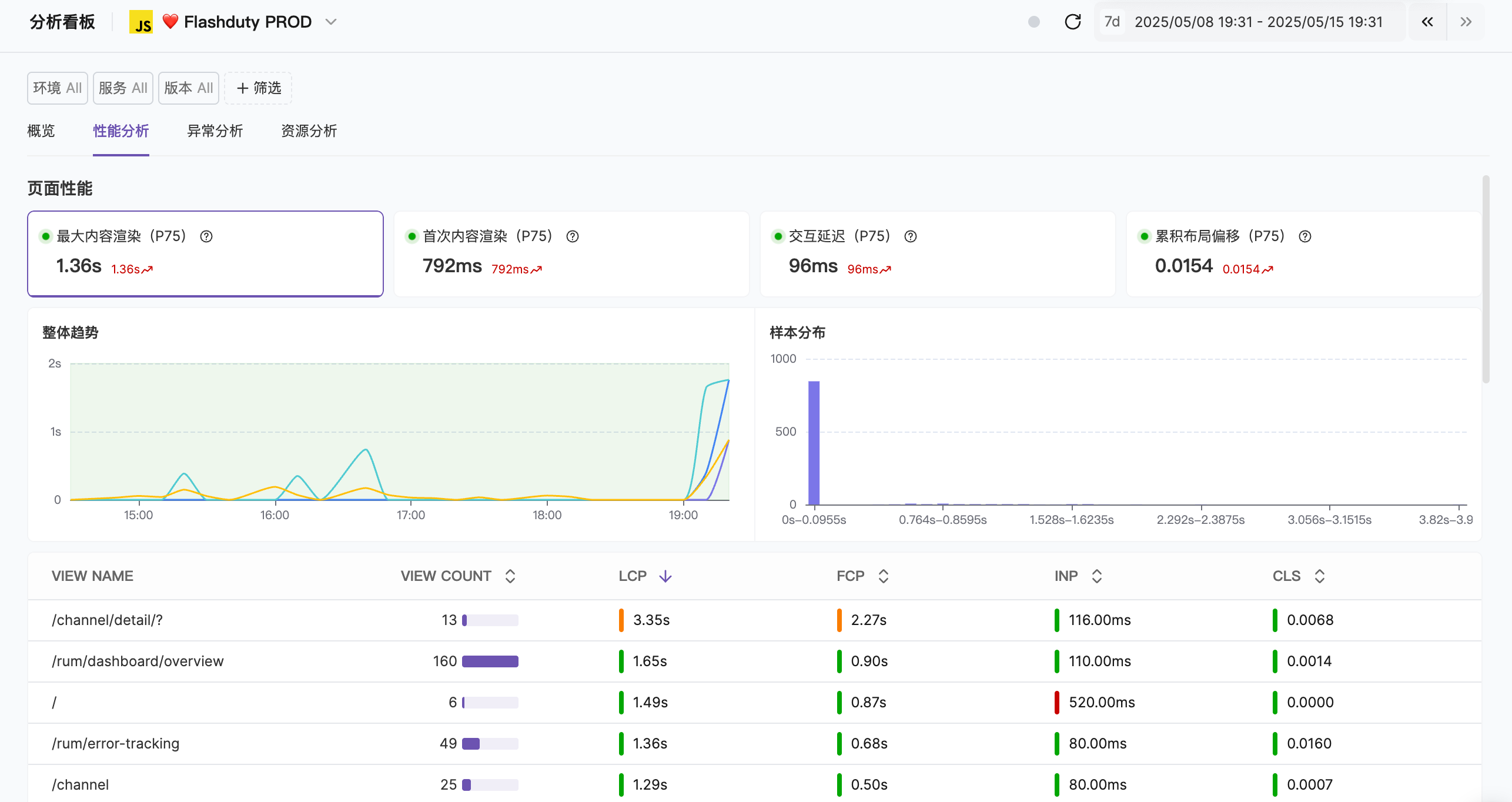 Initial Assessment:
- Data Analysis: View data trends of core performance metrics through the “Application Management - Data Analysis” module
- User Feedback: Discover potential problems through user reports (such as slow page loading or interaction lag)
- Anomaly Detection: Observe anomaly trends, such as increased resource loading failure rates or extended API response times
- Impact Scope: Determine the user groups affected by the problem (e.g., specific regions, devices, or browsers)
- Severity: Assess the direct impact of the problem on user experience
- Business Impact: Analyze the impact of the problem on key business metrics (such as conversion rate or user retention)
Data Collection
Flashduty RUM provides rich performance data and contextual information:Core Performance Data:
- Page Loading Metrics: Including LCP, FCP, TTI
- Resource Loading Time: Analyze loading time of images, scripts, CSS, and other resources
- JavaScript Performance: Monitor script execution time and render-blocking scripts
- Network Requests: Record API request latency, success rate, and error rate
- User Environment: Browser type, device model, operating system, and network conditions
- Error Logs: Capture detailed information about JavaScript errors, network errors, and resource loading failures
- System Resources: Analyze CPU usage, memory consumption, and DOM operation frequency
Common Problem Classification
| Problem Type | Typical Symptoms | Possible Causes | Key Metrics |
|---|---|---|---|
| Slow Page Loading | Long white screen time, slow first screen rendering | Large resource size, render-blocking scripts or CSS, slow server response | LCP, FCP, TTI |
| Interaction Response Delay | No response to clicks, laggy operations | Long JavaScript execution time, too many event listeners, frequent DOM operations | FID, INP, TBT |
| Resource Loading Errors | Image/script loading failure, timeout | CDN configuration errors, unstable network, incorrect resource paths | Resource loading time, failure rate |
| JavaScript Errors | Feature failure, console errors | Code logic errors, browser compatibility issues, memory leaks | Error rate, memory usage |
| Network Connection Issues | Request timeout, connection interruption | Slow API response, poor network quality, cross-origin configuration errors | Request latency, connection success rate |
Problem Localization Tools
- Performance Waterfall Chart
- Error Analysis
The performance waterfall chart displays the complete timeline of page loading, helping you identify bottlenecks.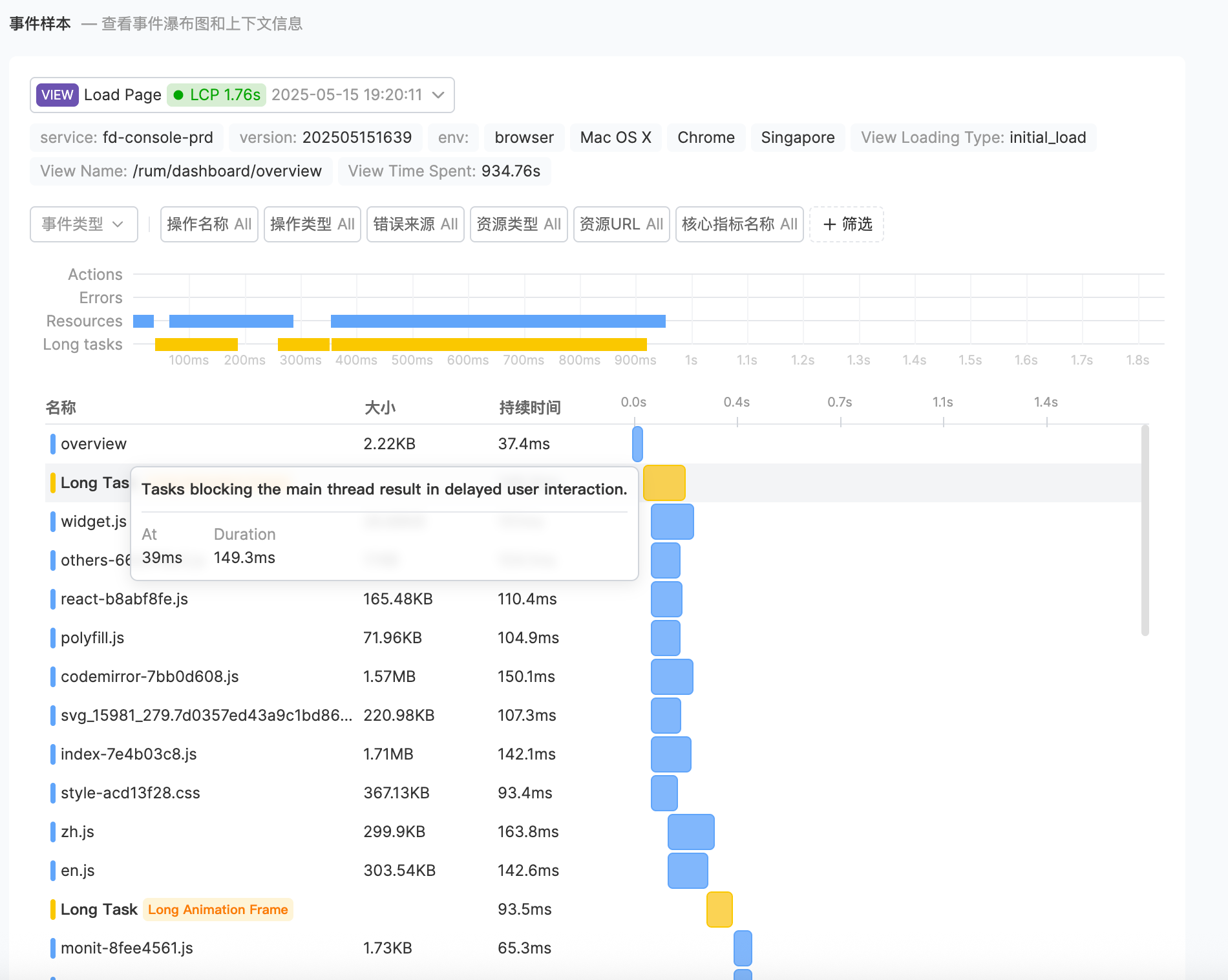 Key Time Points:
- Navigation Start: Time when user initiates page request
- DNS Lookup: Domain name resolution time
- TCP Connection: Time to establish server connection
- Time to First Byte (TTFB): Time to receive the first byte of server response
- DOM Complete: Time when page DOM structure is fully loaded
- Critical Path: Identify critical resources affecting page rendering
- Blocking Resources: Discover scripts or stylesheets blocking rendering
- Loading Order: Optimize resource loading priority
- Resource Size: Check for oversized resources
Optimization Suggestions
After locating the root cause, you can implement optimizations based on the analysis results:Slow Page Loading
Compress resources, optimize critical CSS, enable CDN
Interaction Response Delay
Reduce JavaScript execution time, optimize event listeners
Resource Loading Errors
Check CDN configuration, ensure correct resource paths
JavaScript Errors
Fix code logic, add error boundaries, optimize memory usage
Next Steps
Metrics Reporting
Learn about metrics collection and reporting mechanisms
Performance Analysis
Deep dive into performance data analysis
Diagnosis and Optimization
Learn problem diagnosis and optimization methods