

- Web (JavaScript): Upload
sourcemapfiles via Flashduty CLI - WeChat Mini Program: Upload the
sourcemap.zipgenerated byminiprogram-ci get-dev-source-mapvia Flashduty CLI - HarmonyOS: Upload the ArkTS
sourceMaps.map, optionalnameCache.json, and native.sosymbol files through@flashcatcloud/hvigor-plugin - Android: Automatically upload ProGuard/R8 mapping files and NDK symbol files via a Gradle plugin
- iOS: Upload dSYM symbol files via Flashduty CLI
Why Do You Need Source Mapping?
In modern application development, code is typically minified, obfuscated, or compiled to optimize loading speed and performance. Whether it’s JavaScript minification on the Web, WeChat Mini Program package transformation, HarmonyOS ArkTS build output, ProGuard/R8 obfuscation on Android, or compilation optimization on iOS, these processes cause code location information in error stacks to not directly map to the original source code, increasing debugging difficulty.Map Minified Code
SourceMap records the mapping relationship between minified code and original code, allowing developers to view unminified source code during debuggingPrecise Error Location
Through
SourceMap, you can directly locate the specific position in the original source code in error trackingImprove Debugging Efficiency
Developers don’t need to manually decode minified files, saving time troubleshooting issues
Generate SourceMap
Most modern build tools (such as Webpack, Rollup, or Vite) support generatingSourceMap.
- Webpack
- Vite
- Rollup
Enable After building, the
SourceMap generation in webpack.config.js:dist directory will contain bundle.js and the corresponding bundle.js.map file.Upload SourceMap
Use Flashduty CLI to uploadsourcemap files to the Flashduty server.
Configure Upload Parameters
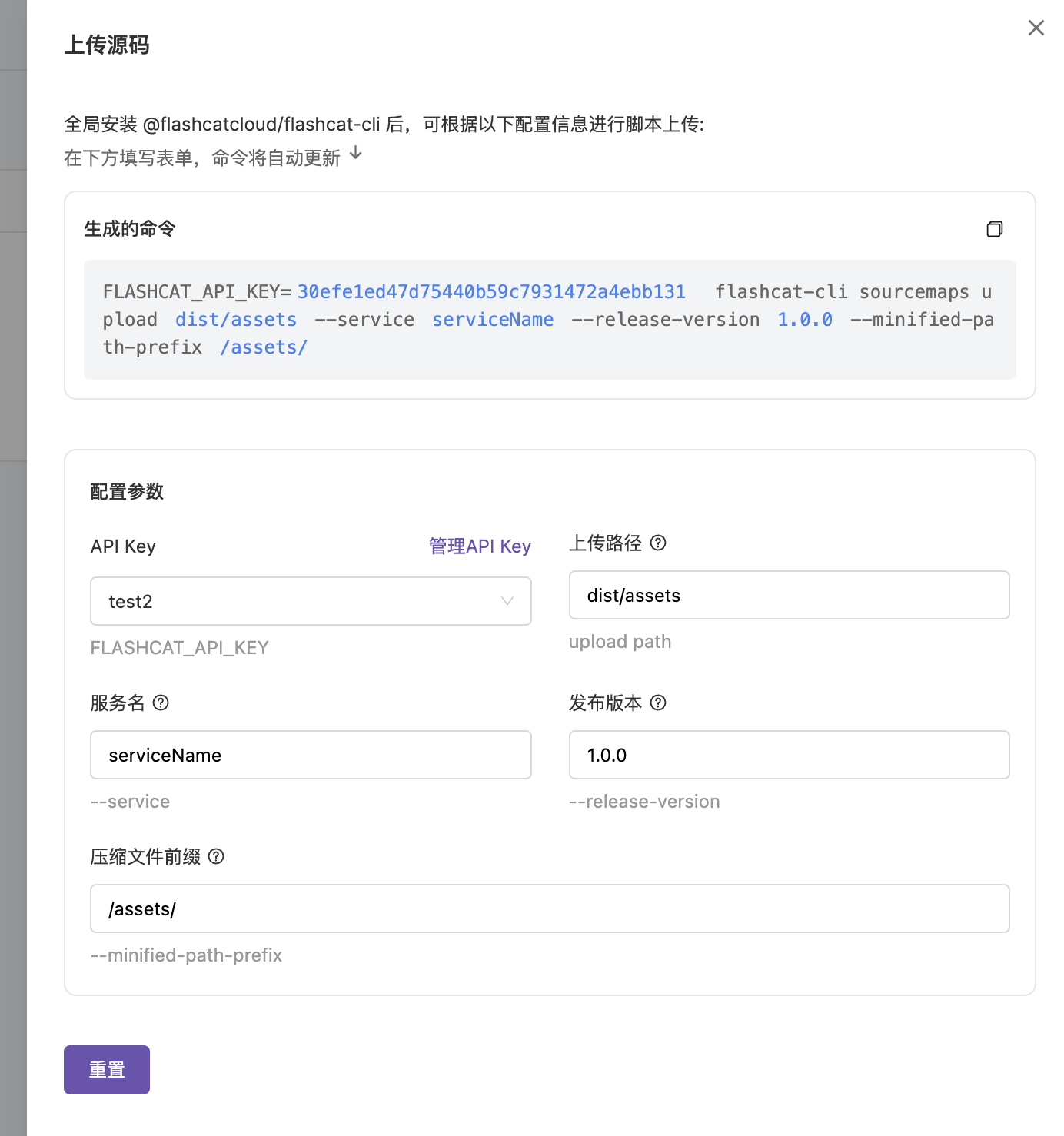
Used to authenticate your identity
Application service name (e.g.,
my-service)Application release version (e.g.,
1.0.0)Path prefix for minified files (e.g.,
/assets)Upload WeChat Mini Program SourceMap
After a WeChat Mini Program is released, production error stacks usually contain only transformed file paths and line and column numbers. You can first useminiprogram-ci get-dev-source-map to generate sourcemap.zip, then upload it through Flashduty CLI. After upload, Flashduty matches Mini Program error stacks by service name, version, and file path, then shows restored source code locations in error details.
Generate the Mini Program SourceMap archive
Run
miniprogram-ci get-dev-source-map in the Mini Program project to generate an uploadable sourcemap.zip file. This file path is used as the --sourcemap-zip parameter in the upload command.The default zip layout produced by miniprogram-ci get-dev-source-map already satisfies the following requirements, so you usually do not need to repackage it:- Main-package
.js.mapentries are placed under the__FULL__/directory, e.g.__FULL__/app-service.js.map - Subpackage
.js.mapentries are placed under a directory named after the subpackage, e.g.subpkg-a/chunk_0.appservice.js.map, and the directory name is recorded as the subpackage tag in metadata - Only entries with the
.js.mapsuffix are processed; other files (README, source files, etc.) are silently ignored - If the zip contains no
.js.mapentries, the upload fails withNo .js.map entries found in the sourcemap archive
Each
.js.map may not exceed 50 MB decompressed; the aggregate decompressed size of the whole archive may not exceed 500 MB; the zip may not contain more than 5000 entries. Exceeding any of these limits returns HTTP 413.Configure upload parameters
In “Application Management” - “Source Code Management”, switch to the “WeChat Mini Program” tab and click “Upload Source Code”. The upload panel generates the command from the form values.
Authenticates the upload request. The page prioritizes API Keys that the current account can access.
Mini Program service name, such as
my-mp. Error parsing uses this value to match the service in error events.Mini Program release version, such as
1.2.3. Error parsing uses this value to match the version in error events.Path to the archive generated by
miniprogram-ci get-dev-source-map, such as ./sourcemap.zip.WeChat Mini Program appid, e.g.
wxbad3e0a65782821c. Used to disambiguate uploads when multiple Mini Programs share the same service + version. Optional when only one Mini Program is involved.Upload HarmonyOS symbols
HarmonyOS crash stacks can contain both ArkTS / JS frames and native.so frames. To restore both kinds in the console, upload these build artifacts:
sourceMaps.map: the primary ArkTS sourcemap bundlenameCache.json: optional, used to restore obfuscated identifier names- Unstripped native
.sofiles: used to symbolicate C/C++ crash stacks
hvigor configuration and upload command. service and version must exactly match what the application reports at runtime, otherwise the server cannot match the uploaded symbols to incoming crash events.
Register the plugin in hvigorfile.ts
Write the panel-generated
service, version, and apiKey settings into hvigorfile.ts:hvigorfile.ts
Upload Android Symbol Files
After Android apps use ProGuard/R8 for code obfuscation, class names and method names in error stacks are replaced with meaningless short names. By uploading mapping files, Flashduty can restore obfuscated stacks to original code. For apps containing NDK native code, NDK symbol files also need to be uploaded to restore C/C++ layer stacks.Add Gradle Plugin
Add the Flashcat Android Gradle plugin to your app module’s Kotlin DSL uses the same plugin ID:
build.gradle:Configure API Key
Provide the API key via Gradle properties, environment variables, or a project configuration file. CI pipelines commonly use environment variables:You can also create a
flashcat-ci.json file in the project root:Configure Upload Options
Add the
flashcat block to your app module’s build.gradle. When fields are not set explicitly, the plugin reads versionName, versionCode, and the application ID from the Android build configuration.By default the plugin selects the upload endpoint from
site: CN uses ci.flashcat.cloud, and STAGING uses ci-dev.flashcat.cloud. For private deployments, set sourcemapEndpoint to a custom intake endpoint (supported since 1.2.0); if the value omits the /sourcemap/upload path it is appended automatically. The three configuration sources are resolved in this order of precedence: flashcat {} extension config > flashcat-ci.json > the FLASHCAT_SOURCEMAP_INTAKE_URL environment variable. Once a custom endpoint is set, site is only used as a fallback and no longer affects the actual upload URL.Run Upload Tasks
After the build completes, run the Gradle tasks to upload symbol files:
The plugin creates
uploadMapping<Variant> tasks for variants with obfuscation enabled. NDK symbol upload tasks are created when the project has a native build or when additionalSymbolFilesLocations is configured. If your project uses multiple flavors, run the upload task for each release variant.Upload iOS dSYM Files
iOS apps generate dSYM (Debug Symbol) files during compilation, containing the debug symbol information needed to map memory addresses back to source code locations. After uploading dSYM files, Flashduty can restore addresses in crash stacks to readable function names, file names, and line numbers.Obtain dSYM Files
dSYM files can be obtained from the following locations:
- Xcode Local Build: Find
.dSYMfiles in the Xcode Build Products directory - Xcode Archive: Export dSYMs through the Organizer window
- App Store Connect: Download dSYMs from App Store Connect (requires enabling symbol upload in build settings)
Symbol File Management
On the Flashduty platform, symbol file management is done through the “Application Management” - “Source Code Management” menu:| Feature | Description |
|---|---|
| View Uploaded Symbol Files | List all uploaded files (SourceMaps, Mini Program SourceMaps, ProGuard mapping files, dSYMs, and NDK native symbol files), including path, service name, version, size, and upload time. The Android tab shows both ProGuard mapping files and NDK native symbol files; NDK rows display build_id, arch, and lib_name columns |
| Filter by Platform | Switch between Web, WeChat Mini Program, iOS, and Android tabs to view symbol files for each platform |
| Version Management | Manage different application versions separately through service and release-version parameters |
| Mini Program Dimensions | The WeChat Mini Program list shows the AppID column (from metadata.appid) and the Subpackage column (from metadata.subpackage); the main package without a subpackage tag shows “Main Package”, and an unspecified AppID shows - |
| Permission Control | Ensure only authorized users can upload or manage through API Key |
View Source Code in Error Tracking
RUM Error Tracking can use Websourcemap files, WeChat Mini Program SourceMaps, Android mapping files, and iOS dSYM files to restore error stacks and show original source code locations in error details for precise debugging.
Capture Errors
RUM SDK automatically captures application errors and sends error stack information to the server. Web scenarios typically include JavaScript exceptions, Promise rejections, and network errors; native scenarios include crashes, exceptions, and stack information required for symbolication.
Associate Symbol Files
When file paths, line numbers, or address information in the error stack match uploaded Web Mapped source code:
sourcemap files, WeChat Mini Program SourceMaps, Android ProGuard mapping files, Android NDK native symbol files, or iOS dSYM files, Flashduty automatically maps minified, obfuscated, or compiled error locations back to the original source code.Minified file stack:View Error Details
In the Error Tracking module, click a specific error record to view:
- Error message: e.g.,
Something went wrong - Original stack: Mapped source code file path, line number, and column number
- Context code: Display source code snippet near the error location
sourcemap.zip.Best Practices
Standardize SourceMap Upload
Standardize SourceMap Upload
Integrate upload commands in CI/CD pipelines to ensure automatic upload of Web
sourcemap files or WeChat Mini Program sourcemap.zip with each release.GitHub Actions Example:Version Management
Version Management
Use the
--release-version parameter to match the application version number for easy tracking of specific version sourcemaps.Clean Up Source Code
Clean Up Source Code
Delete
sourcemap files before uploading resources to CDN to avoid bringing source code information into production.Test Mapping Effect
Test Mapping Effect
After uploading
sourcemap, proactively throw test errors to verify that the Error Tracking module correctly maps to source code.Frequently Asked Questions
Why isn't the error stack mapped to source code?
Why isn't the error stack mapped to source code?
- Confirm that
sourcemapwas successfully uploaded andminified-path-prefixmatches the actual deployment path - Check that
serviceandrelease-versionmatch the application version when the error occurred - For WeChat Mini Programs, confirm that the
sourcemap.zipfor the corresponding version has been uploaded
How to prevent SourceMap from leaking sensitive information?
How to prevent SourceMap from leaking sensitive information?
- Ensure
sourcemapfiles are only uploaded to the Flashduty server, not directly exposed on the public network - In production, remove direct access to
sourcemapfiles (e.g., through Nginx configuration)
What if SourceMap upload fails?
What if SourceMap upload fails?
- Check if
API Keyis valid - Ensure network connection is normal and CLI version is the latest
Can Mini Program errors with empty stacks but a stack-like message still be source-mapped?
Can Mini Program errors with empty stacks but a stack-like message still be source-mapped?
Yes. For Mini Program errors emitted by older SDKs that pack the stack into the message field, Flashduty automatically recognizes the stack inside the message and feeds it into both SourceMap restoration and error grouping. After upgrading to a newer SDK, pre-existing errors may regroup under the new rule and the grouping may differ from what was seen before the upgrade.
Next Steps
Error Grouping
Learn about error grouping mechanisms
Issue Status
Manage Issue status transitions