

Where Are Filter Conditions Used?
Filter conditions apply to the following scenarios:
| Scenario | Description |
|---|---|
| Escalation Rules | A single channel can have multiple escalation rules, each with different filter conditions to set different assignees for different incidents |
| Silence Rules | Set filter conditions to match specific incidents; matching incidents will be silenced |
| Inhibit Rules | Set filter conditions to match newly triggered incidents and existing active incidents; when new incidents match, they are inhibited |
| Alert Grouping | Set filter conditions to match specific alerts and configure new grouping dimensions for them |
| Routing Rules | When using Integration Center alert integrations, set global routing rules to route different alerts to specific channels |
| Label Enhancement | Set filter conditions to match specific alerts; matching alerts generate labels according to rules |
| Alert Processing | Set filter conditions to match specific alerts; matching alerts are processed according to rules |
How to Configure Filter Conditions?
Rule Design
Flashduty On-call abstracts the entire filter condition system, aiming for minimal configuration while meeting most scenario requirements. The overall judgment logic consists of multiple condition groups:- Conditions within a group:
ANDrelationship—each condition must match for the group to match - Between groups:
ORrelationship—any group matching means overall match
- Match (
IN): Target can have multiple values; if any value satisfies the condition, that condition matches - Not Match (
NOTIN): Target can have multiple values; if all values don’t satisfy the condition, that condition matches
Available fields
Filter condition keys fall into two categories:| Category | Key | Meaning |
|---|---|---|
| Built-in attribute | data_source_id | Integration; value is the integration instance ID |
| Built-in attribute | severity | Severity (Critical / Warning / Info) |
| Built-in attribute | title | Alert / incident title |
| Built-in attribute | description | Alert / incident description |
| Dynamic label | labels.<name> | Any label key prefixed with labels., e.g., labels.service, labels.host |
Historically,
alert_severity (alert severity) and incident_severity (incident severity) were used as two separate fields. They are now unified as severity. When loading legacy rules, the system automatically migrates both keys to severity — you don’t need to edit anything manually; simply saving the rule will persist the new key.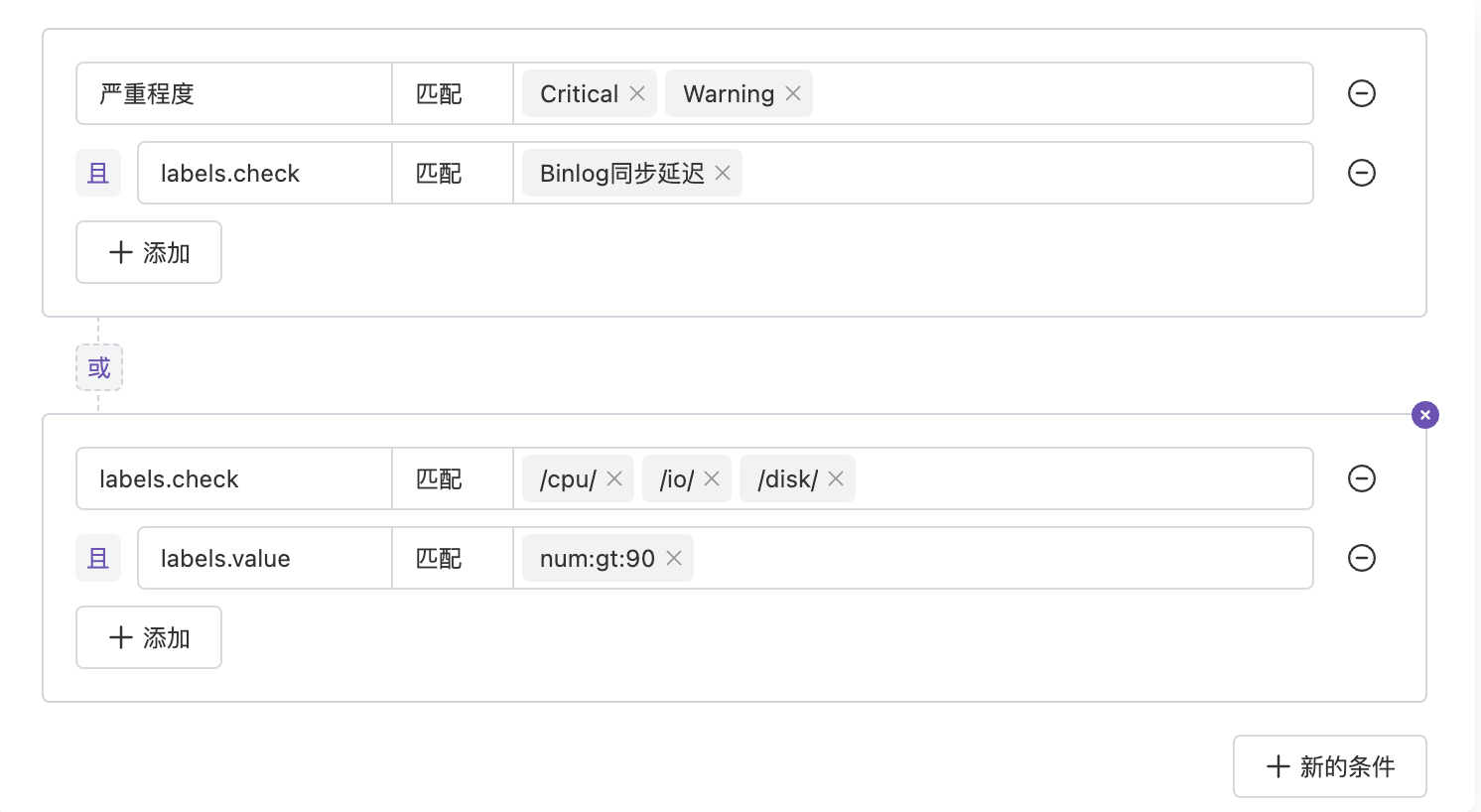 As shown above, we have two condition groups, each with two conditions, and conditions have multiple match values. The expression is:
Matching Methods
- Regex Matching
- Wildcard Matching
- IP Range Matching
- Numeric Matching
- Exact Matching
When a value string has
/ as prefix and suffix, the entire value is recognized as regex.Example:labels.check:/outage/— matches when check label contains “outage”
Flashduty uses
RE2 regex specification platform-wide. Some Perl syntax may not match. You can use AI Chatbot to generate expressions and verify at RE2 Playground.FAQ
Why doesn't the system suggest available labels?
Why doesn't the system suggest available labels?
Flashduty On-call receives large volumes of data. To ensure system stability, the system only searches the most recent 500 alert events from the past 24 hours for label deduplication. Therefore, extracted labels may change dynamically, or no labels may be extracted if there’s no new data in the past 24 hours.In this case, you can manually enter labels.
My regex passed validation offline, why won't it match in the system?
My regex passed validation offline, why won't it match in the system?
Flashduty uses
RE2 regex specification platform-wide. Some Perl syntax may not match. You can use AI Chatbot to generate expressions and verify at RE2 Playground.