

Core Concepts
Understanding these concepts before configuration will help you better plan your schedules:
| Concept | Description |
|---|---|
| Schedule | An independent on-call unit (e.g., “SRE Schedule”, “DBA Schedule”) containing multiple specific on-call rules |
| Layer | A schedule can contain multiple layers of rules. For example, layer one is “Day Shift”, layer two is “Night Shift”. Multiple layers combine to form the complete on-call plan |
| Rotation | Determines how on-call personnel hand off. For example, “handoff every Monday at 10 AM” |
| Override | Temporarily adjust the on-call person for a specific time period without modifying permanent rules (commonly used for leave, temporary coverage) |
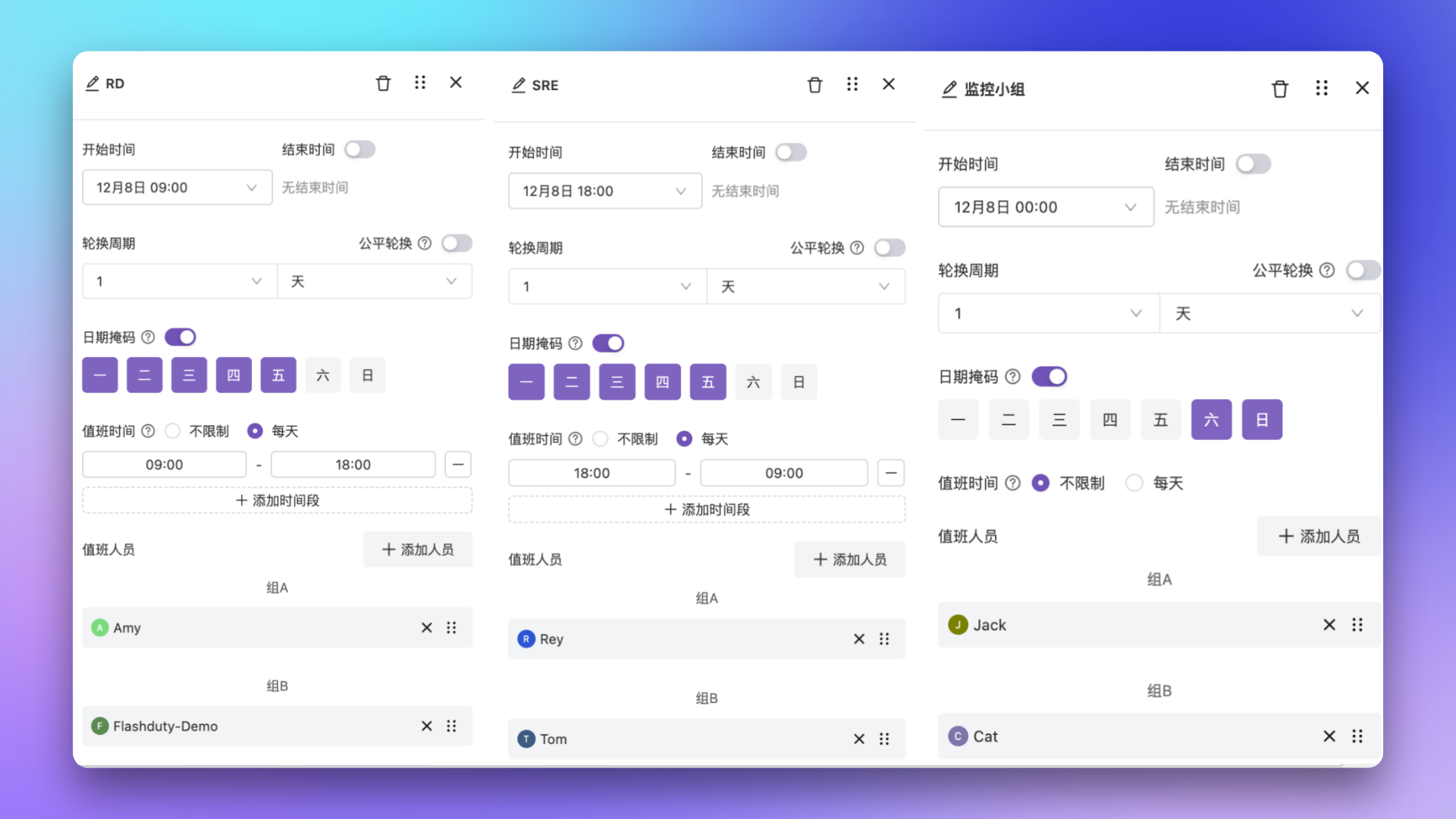
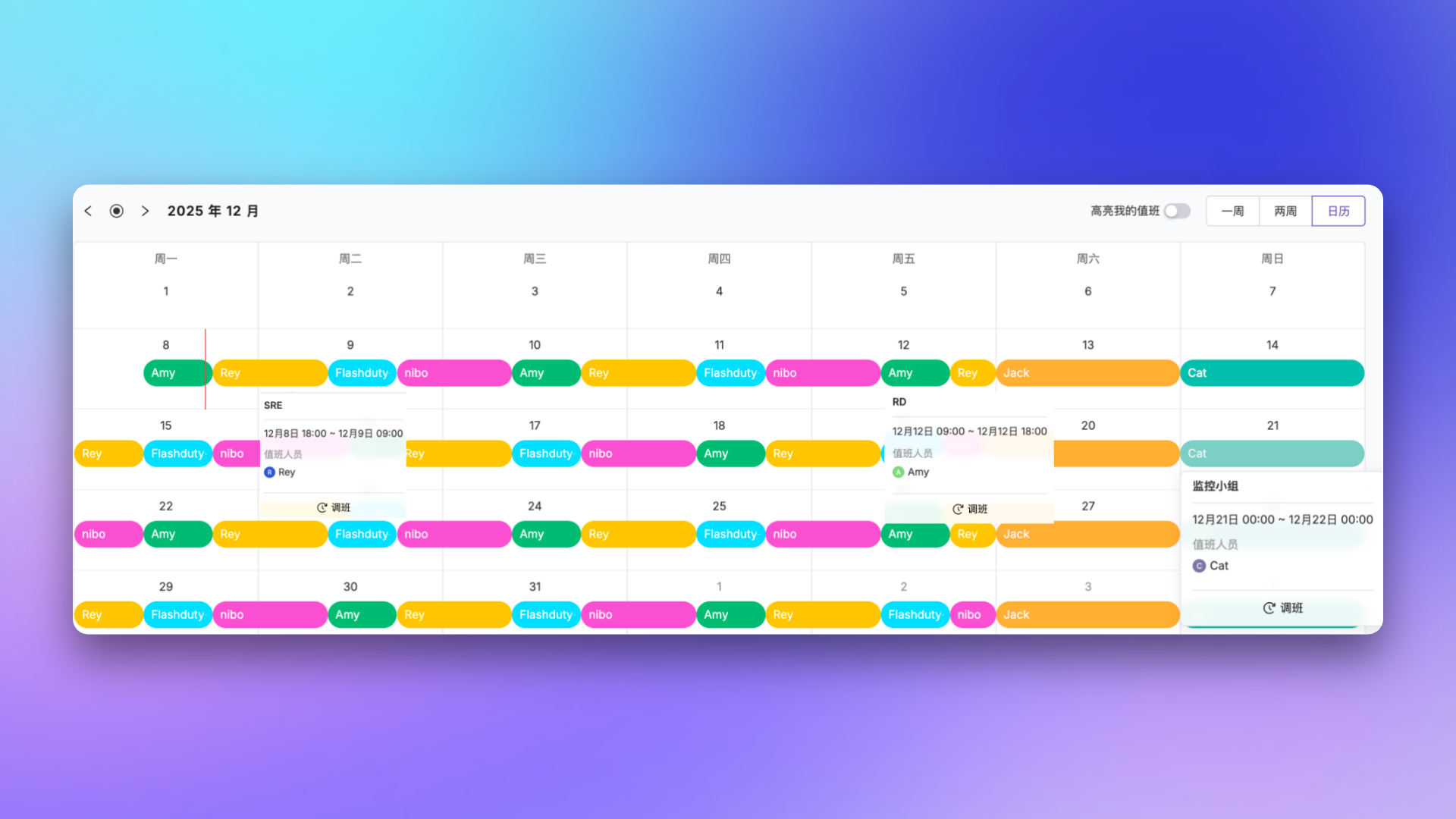
| Date Mask | Select which days to participate in on-call, e.g., Team A on-call Monday to Friday, Team B on weekends |
| Continuous Rotation | When enabled, rotation boundaries are calculated based on shift start time, preventing shifts from being split at 00:00. Only supported when date mask is configured. See Date mask and continuous rotation for details |
| Fair Rotation | The system automatically adjusts rotation order to ensure each member gets opportunities in different time periods, preventing someone from always being on-call during weekends |
Configuration Process
Create a Schedule
Go to Schedule Management, click “Create Schedule”
- Schedule Name: 1–40 characters, must be unique within the account
- Owning Team: Specifies which team manages this schedule; team members gain edit permissions for this schedule
- Schedule Description: Supports Markdown syntax, content can be included in notifications; up to 500 characters
Set Shift Notifications
To prevent forgetting shifts or handoffs, the system provides two notification triggers:
- Advance Notification: Notifies both outgoing and incoming personnel N minutes before handoff (in 5-minute increments)
- Scheduled Notification: Sends a daily notification at a fixed time (e.g., 8:00 AM) reminding who is currently on-call
- Personal Channels: Send notifications directly to on-call personnel
- Follow personal preference: Each responder receives notifications via their personally configured channels
- Follow unified settings: Administrators select notification channels (SMS, email, and integrated IM apps)
- Group Chat Channels: Send notifications to group chats, supporting the following platforms:
- Feishu app, DingTalk app, Slack app (select chat groups via integrated IM apps)
- WeCom bot, DingTalk bot, Feishu bot (send via webhook URL)
- Slack bot, Telegram bot, Zoom bot
Define On-call Rules
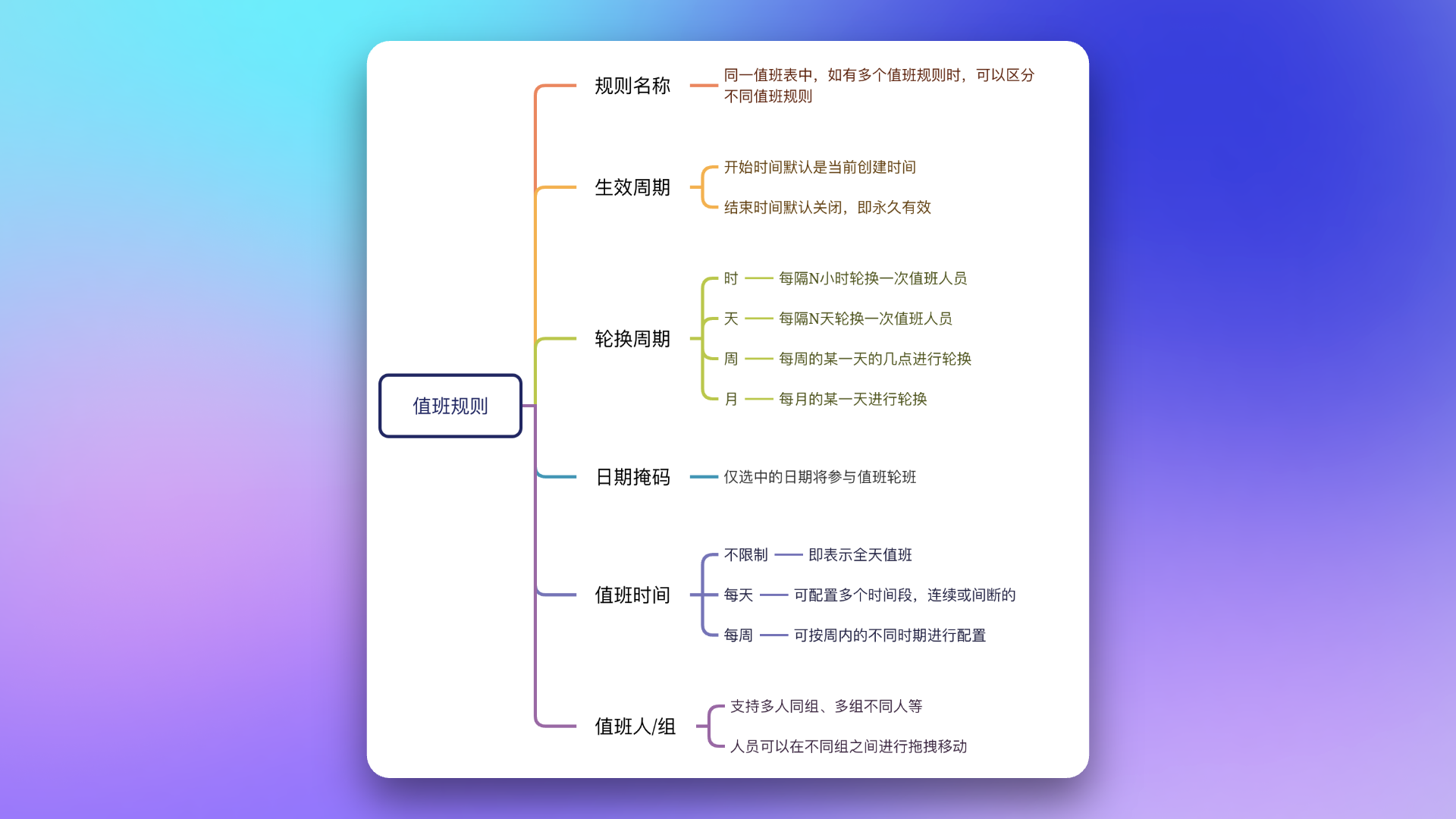
This is the core step. You can add one or more layers of rules. Each layer includes:
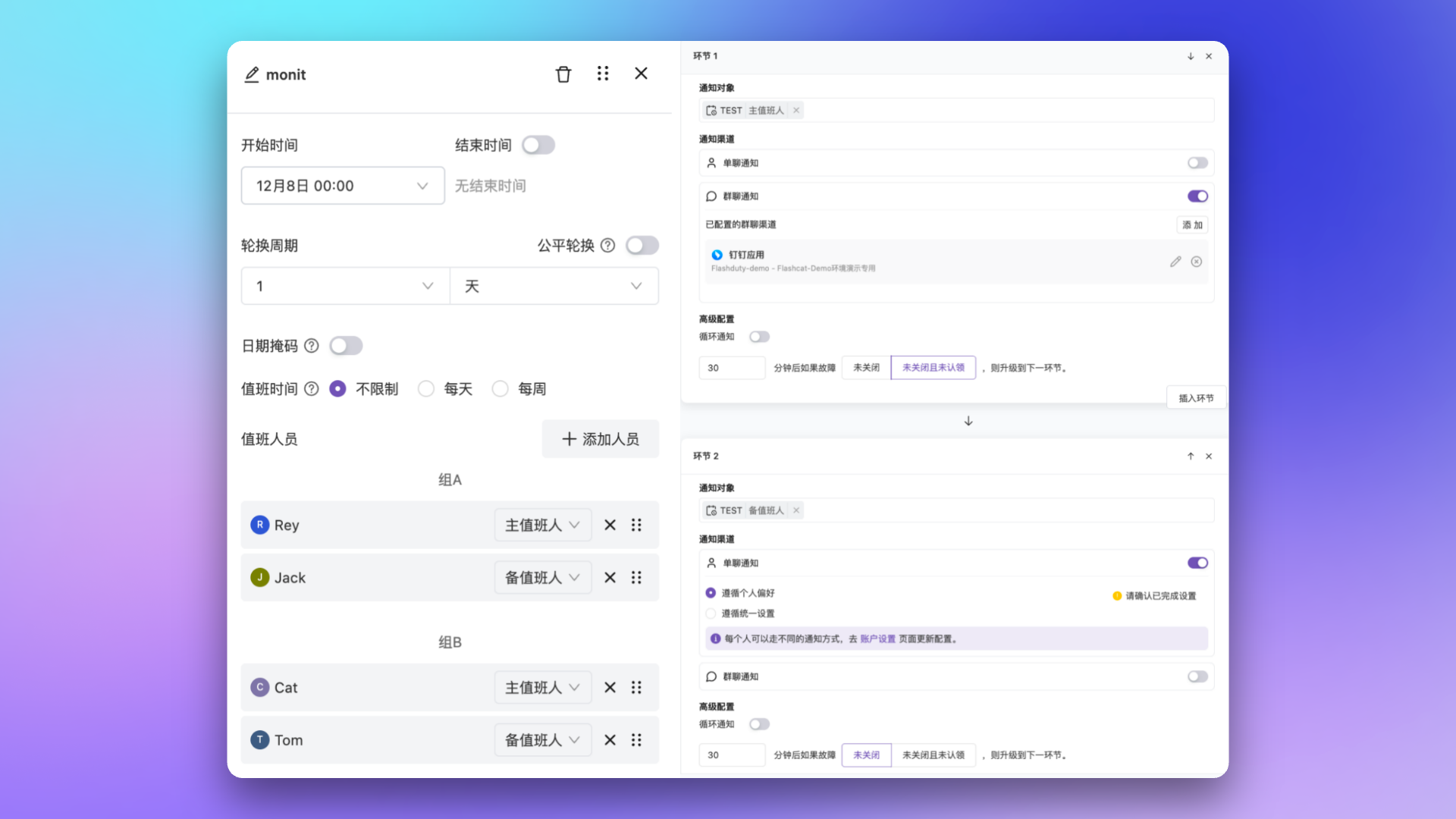
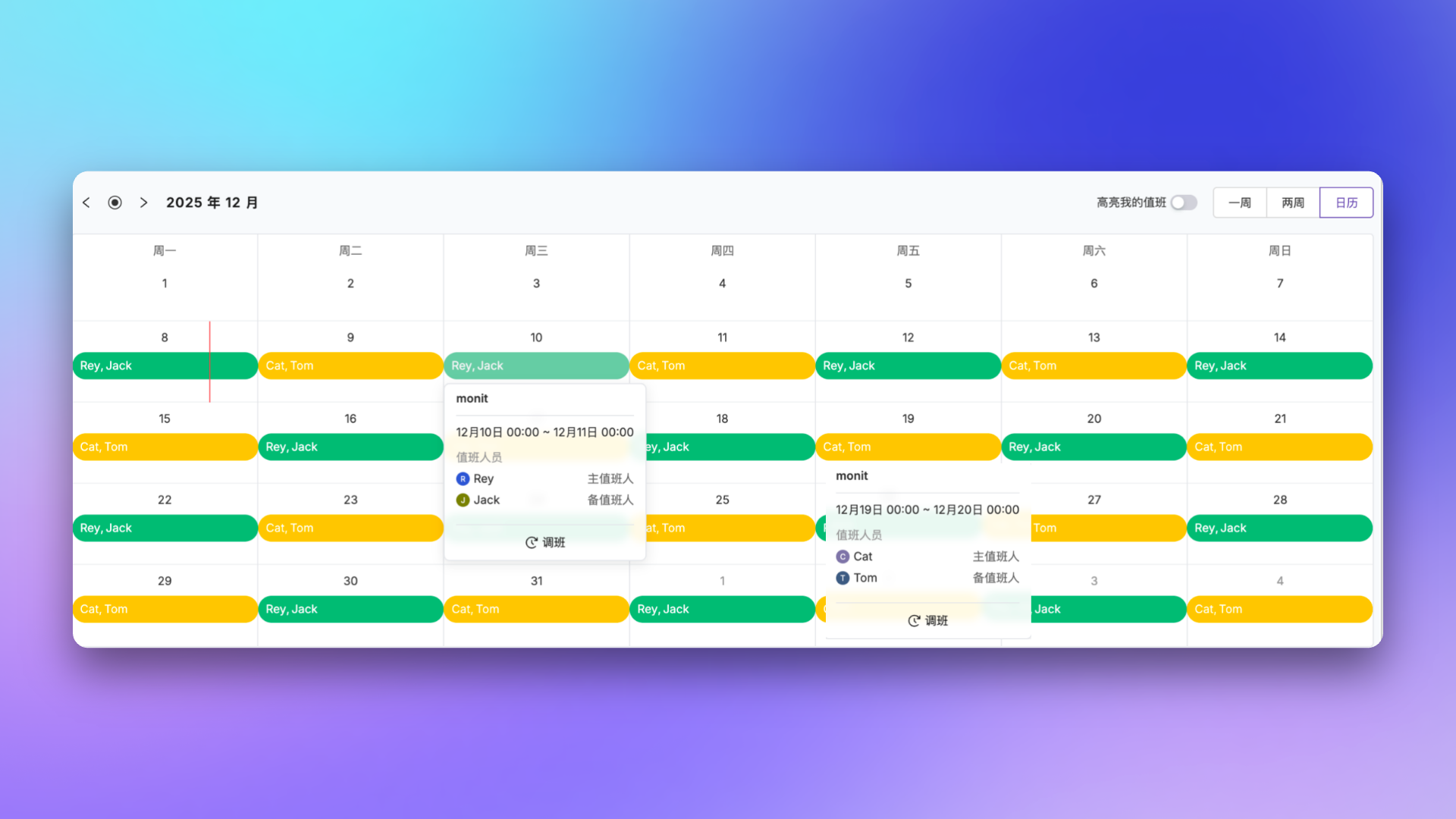
- On-call Personnel: Select members participating in rotation, supports grouping and primary/backup roles
- Start Time: When this layer of rules takes effect
- End Time (optional): When this layer expires. Leave blank for no expiration. Combined with the start time, this is useful for phased rotations — for example, “effective starting next Monday” or “valid within this quarter”
- Rotation Cycle: Supports four units — hour, day, week, and month — with values from 1 to 30. For example, “2 days” means rotation every 2 days
- Handoff Time: When the rotation cycle adds up to 1 week (e.g., 1 week, or 7 days), you can specify the day and time for handoff
- Fair Rotation: When enabled, the system automatically adjusts rotation order to prevent someone from always being on-call during weekends
- Date Mask: Select which days of the week to schedule on-call. Monday through Friday are selected by default. See Date mask and continuous rotation for details
- Time Restriction: (Optional) Restrict actual on-call hours within each rotation cycle, with the following modes:
- No restriction: Members are on-call for the entire rotation cycle
- Daily: Set daily on-call time ranges (e.g., 09:00–18:00), multiple periods can be added
- Weekly: Set day+time on-call ranges (e.g., Monday 09:00 – Friday 18:00), multiple periods can be added
When date mask is enabled, the “Weekly” restriction mode is unavailable since the date mask already provides day-of-week control. If you enable the date mask while the time restriction is already in “Weekly” mode, the system automatically resets it to “No restriction” to avoid conflicts. After setting time restrictions, there may be gaps with no one on-call — ensure other rules provide coverage.
On-call roles
On-call roles in Flashduty aren’t limited to “primary / backup” — they are an account-level resource. You can maintain any number of named roles (such as “R&D primary on-call”, “DBA backup on-call”, or “SRE responder”) on the account role-management page, and map members to the corresponding roles when configuring a schedule.
- Account-level resource: Roles are managed centrally at the account level and shared across all schedules
- Grouped by role inside a rule: When adding personnel to a schedule rule, you can bind members to a specific role ID, forming a “role → member” mapping
- Escalation rules target by role: Escalation rules support notifying all on-call personnel, specific roles (e.g., notify primary only), or specific members, enabling finer-grained alert routing
Override and time off
When on-call personnel need time off or have a temporary conflict, don’t modify permanent rules — use the “Override” feature instead. An override is an independent rule type that fully preempts the normal on-call rules within its effective window. Once the window ends, the original rules resume automatically.
Two ways to create an override
Create from the calendar
On the schedule details page, click the time slot you want to adjust in the calendar view, and choose Override. The system prefills the default window as [today 00:00, next day 00:00], which you can adjust as needed.
Configurable fields
Overrides have a smaller field set than regular rules and only include:- Start Time / End Time: Define the override window. Defaults to
[today 00:00, next day 00:00] - Replacement Person: The member who replaces the original on-call person within that window
- Preemption semantics: Within its time window, an override fully replaces all regular on-call rules (regardless of which layer they belong to), rather than stacking with them. Once the window ends, the original rules automatically resume
- Audit trail: All override records are saved for later review
Date mask and continuous rotation
Date mask
Date mask controls which days of the week an on-call rule takes effect. By selecting different day combinations, you can flexibly implement differentiated scheduling between weekdays and weekends. Common use cases:- Weekday/weekend separation: Team A on-call during weekdays, Team B on weekends
- Specific day scheduling: Assign certain personnel only on Monday, Wednesday, and Friday
- Day/night shift by day: Configure day and night shift rules for weekdays, and full-day on-call rules for weekends
Continuous rotation
By default, schedules are divided at 00:00 each calendar day. If a shift spans midnight, it will be split into separate time segments.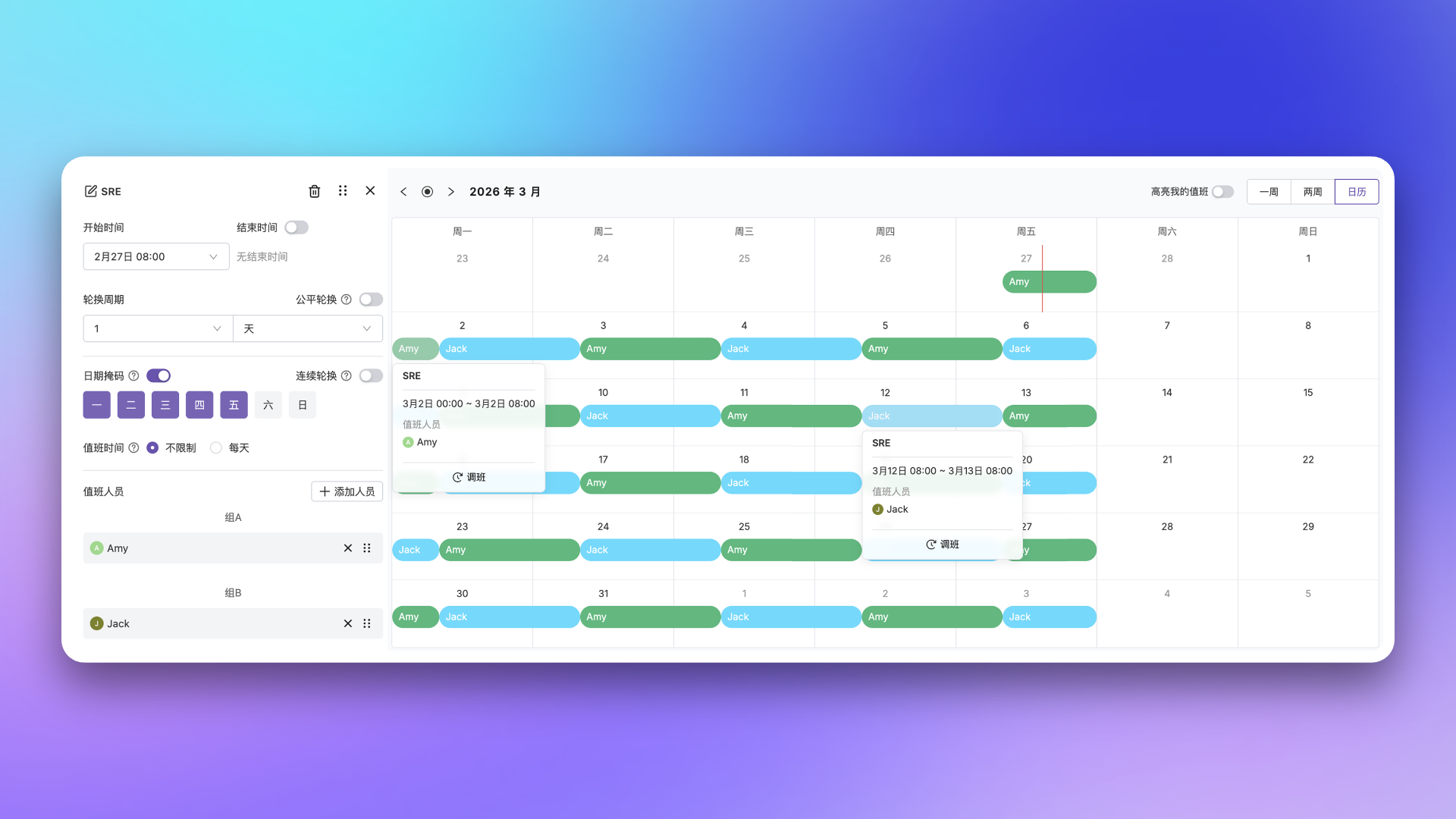 When continuous rotation is enabled, rotation boundaries are calculated based on shift start time rather than the 00:00 cutoff. Each on-call member will complete a full rotation cycle without being split at midnight.
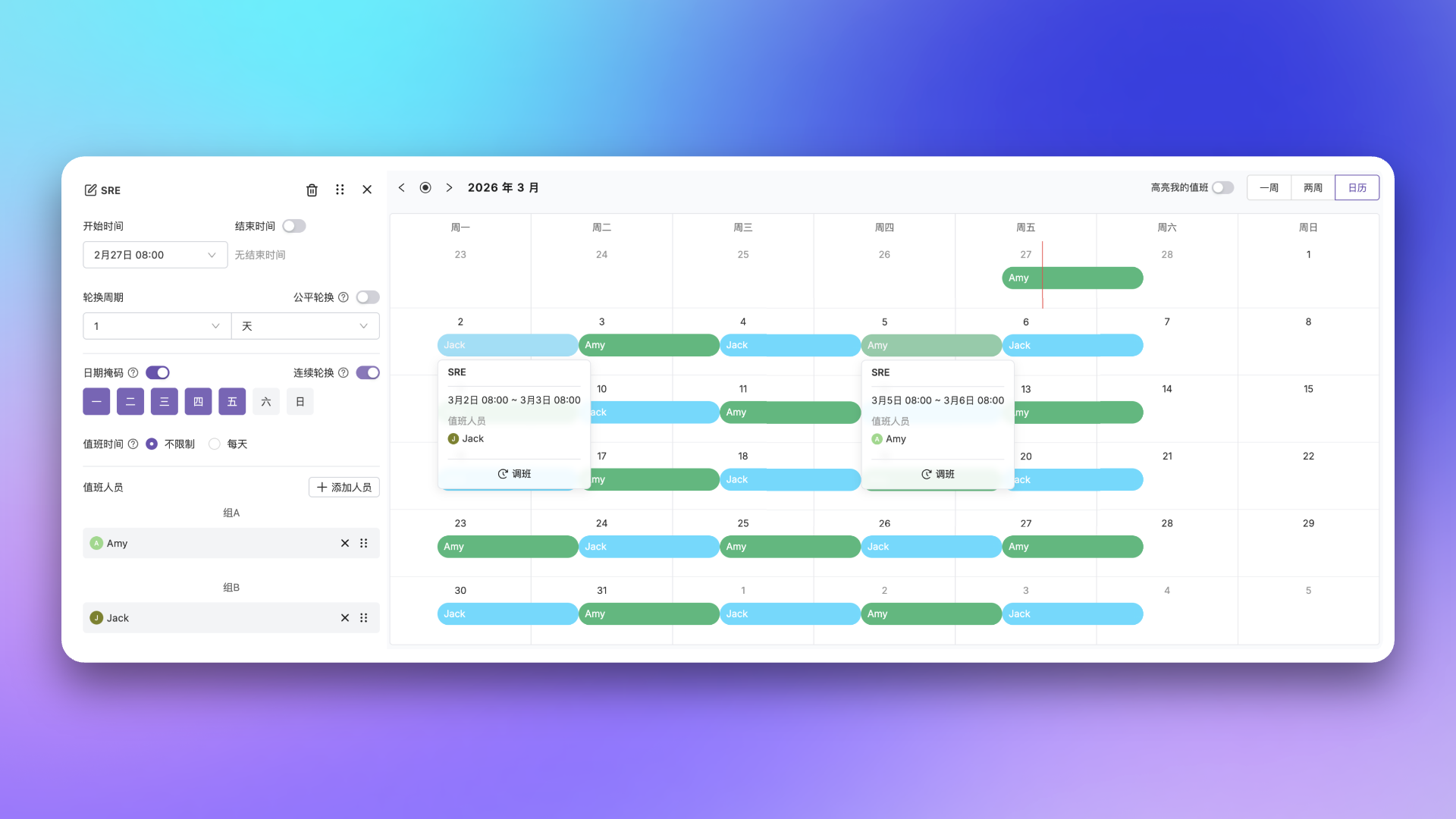
Consider enabling continuous rotation in the following scenarios:
- Rotation cycle is 24 hours
- Shift start time is not 00:00
- Day-of-week date mask is configured
- Different rotation rules for weekdays and weekends
Common scheduling scenarios
- 24/7 Simple Rotation
- Day/Night Shift Separation
- Primary/Backup On-call
Requirement: Ops team has A, B, C—each person on-call for one week, handoff Monday at 10:00 AM.Configuration: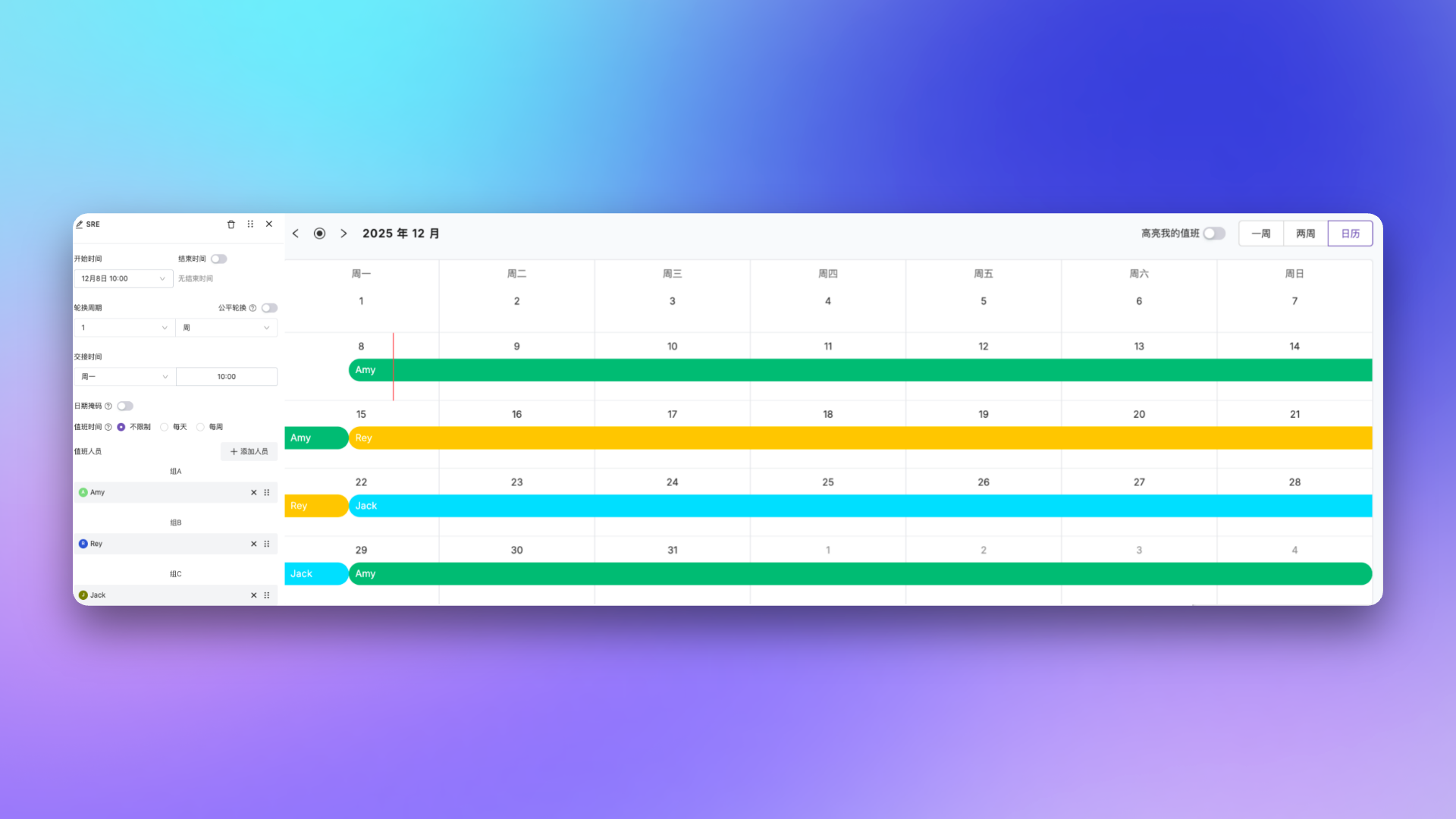
- Personnel sequence: A, B, C
- Rotation cycle: 1 week
- Handoff time: Monday 10:00
View schedule details
Click a schedule name to enter the detail page, where you can view the scheduling calendar and manage on-call rules. The upper right corner provides these options:
- View switcher: Toggle between “Week”, “Two Weeks”, and “Calendar” (month view)
- Highlight my shifts: When enabled, your on-call shifts are highlighted for quick identification
View Personal Schedule
Go to Schedule → Personal Schedule to view all your on-call assignments in a unified view. The top of the page shows the names of schedules where you are currently on-call. Click a name to navigate to the corresponding schedule details. You can switch the viewing range using the time range buttons in the upper right corner:
| Option | Description |
|---|---|
| 1 Day | View today’s on-call assignments |
| 4 Days | View on-call assignments for the next 4 days |
| 1 Week | View on-call assignments for the next week |
| 2 Weeks | View on-call assignments for the next 2 weeks (default) |
| 1 Month | View on-call assignments for the next month |
Related Topics
Escalation Rules
Configure alert notification rules and escalation paths
Service Calendar
Define workdays and rest days