Flashduty Docs
中文English
RoadmapAPI官网控制台
中文English
RoadmapAPI官网控制台
  1. Android
  • Introduction
  • On-call
    • Getting Started
      • Quick start
      • FAQ
      • Product Comparison
    • Incidents
      • What is an Incident
      • View Incidents
      • Handle Incidents
      • Escalations and Assignments
      • Custom Fields
      • Custom Actions
      • Alert Noise Reduction
      • Past Incidents
      • Outlier Incidents
      • Status Pages
    • Configure On-call
      • Channels
      • Integrate Alerts
      • Alert Noise Reduction
      • Escalation Rules
      • Label Enrichment
      • Schedules
      • Templates
      • Service Calendars
      • Preferences
      • Alert Routing
      • Silence and Inhibition
      • Filters
      • Notifications
      • Alert Pipeline
    • Advanced Features
      • Referencing Variables
      • Dynamic Assignment
      • Insights
      • War-room
    • Integrations
      • Alerts integration
        • Standard Alert Integration
        • Email Integration
        • Nightingale/FlashCat Integration
        • Prometheus Integration
        • Grafana Integration
        • Zabbix Integration
        • Uptime Kuma Integration
        • Alibaba Cloud ARMS Integration
        • Alibaba Cloud Monitor CM Event Integration
        • Alibaba Cloud Monitor CM Metrics Integration
        • Alibaba Cloud SLS Integration
        • AWS CloudWatch Integration
        • Azure Monitor Integration
        • Baidu Cloud BCM Integration
        • Huawei Cloud CES Integration
        • Influxdata Integration
        • Open Falcon Integration
        • PagerDuty Integration
        • Tencent BlueKing Integration
        • Tencent Cloud CLS Integration
        • Tencent Cloud Monitor CM Integration
        • Tencent Cloud EventBridge
        • OceanBase Integration
        • Graylog Integration
        • Skywalking Integration
        • Sentry Integration
        • Jiankongbao Integration
        • AWS EventBridge Integration
        • Dynatrace Integration
        • Huawei Cloud LTS Integration
        • GCP Integration
        • Splunk Alert Events Integration
        • AppDynamics Alert Integration
        • SolarWinds Alert Events Integration
        • Volcengine CM Alert Events Integration
        • Volcengine CM Event Center Integration
        • Volcengine TLS Integration
        • OpManager Integration
        • Meraki Integration
        • Keep Integration
        • ElastAlert2 Alert Integration
        • StateCloud Alert Events
        • Guance Alert Events
        • Zilliz Alert Events
        • Huawei Cloud APM Alerts
        • zstack integration
        • Monit Alert Integration
        • RUM Alert Integration
      • Change integration
        • Standard Change Event
        • Jira Issue Events
      • IM integration
        • Feishu (Lark) Integration Guide
        • Dingtalk Integration
        • WeCom Integration
        • Slack Integration
        • Microsoft Teams Integration
      • Single Sign-On
        • Authing Integration
        • Keycloak Guide
        • OpenLDAP Guide
      • Webhooks
        • Alert webhook
        • Incident webhook
        • Costom action
        • ServiceNow Sync
        • Jira Sync
      • Other
        • Link Integration
  • RUM
    • Getting Started
      • Application Management
      • Introduction
      • Quick Start
    • SDK Integration
      • Android
        • Data Collection
        • SDK Integration
        • Advanced Configuration
        • Compatibility
      • iOS
        • Data Collection
        • Compatibility
        • SDK Integration
        • Advanced Configuration
      • Web
        • Data Collection
        • SDK Integration
        • FAQ
        • Advanced Configuration
        • Compatibility
    • Session Explorer
      • Overview
      • Data Query
    • Analysis Dashboard
      • Web
      • Native
    • Performance Monitoring
      • Metrics
      • Performance Optimize
      • Overview
      • Performance Analysis
    • Error Tracking
      • Issues
      • Error Grouping
      • Source Mapping
      • Overview
      • Issue Status
      • Issue Alerting
      • Error Reporting
        • iOS
        • Android
        • Web
    • Best Practice
      • Distributed Tracing
    • Session Replay
      • View Session Replay
      • SDK Configuration
      • Overview
      • Privacy Protection
    • Others
      • Data Collection
      • Terminology
      • Data Security
  • Monitors
    • Getting Started
      • Introduction
      • Quick Start
    • Alert Rules
      • Prometheus
      • ElasticSearch
      • Loki
      • ClickHouse
      • MySQL
      • Oracle
      • PostgreSQL
      • Aliyun SLS
      • VictoriaLogs
    • FAQ
      • FAQ
  • Platform
    • Teams and Members
    • Permissions
    • Single Sign-On
  • Terms
    • Terms of Service
    • User Agreement/Privary Policy
    • SLA
    • Data Security
中文English
RoadmapAPI官网控制台
中文English
RoadmapAPI官网控制台
  1. Android

SDK Integration

Overview#

Flashcat Android RUM SDK supports Android 6.0 (API level 23) and above. By integrating the SDK, you can monitor your Android application's performance, errors, and user behavior in real-time.

Integration Steps#

Step 1: Add SDK Dependencies#

Add the Flashcat SDK dependencies to your app module's build.gradle file:

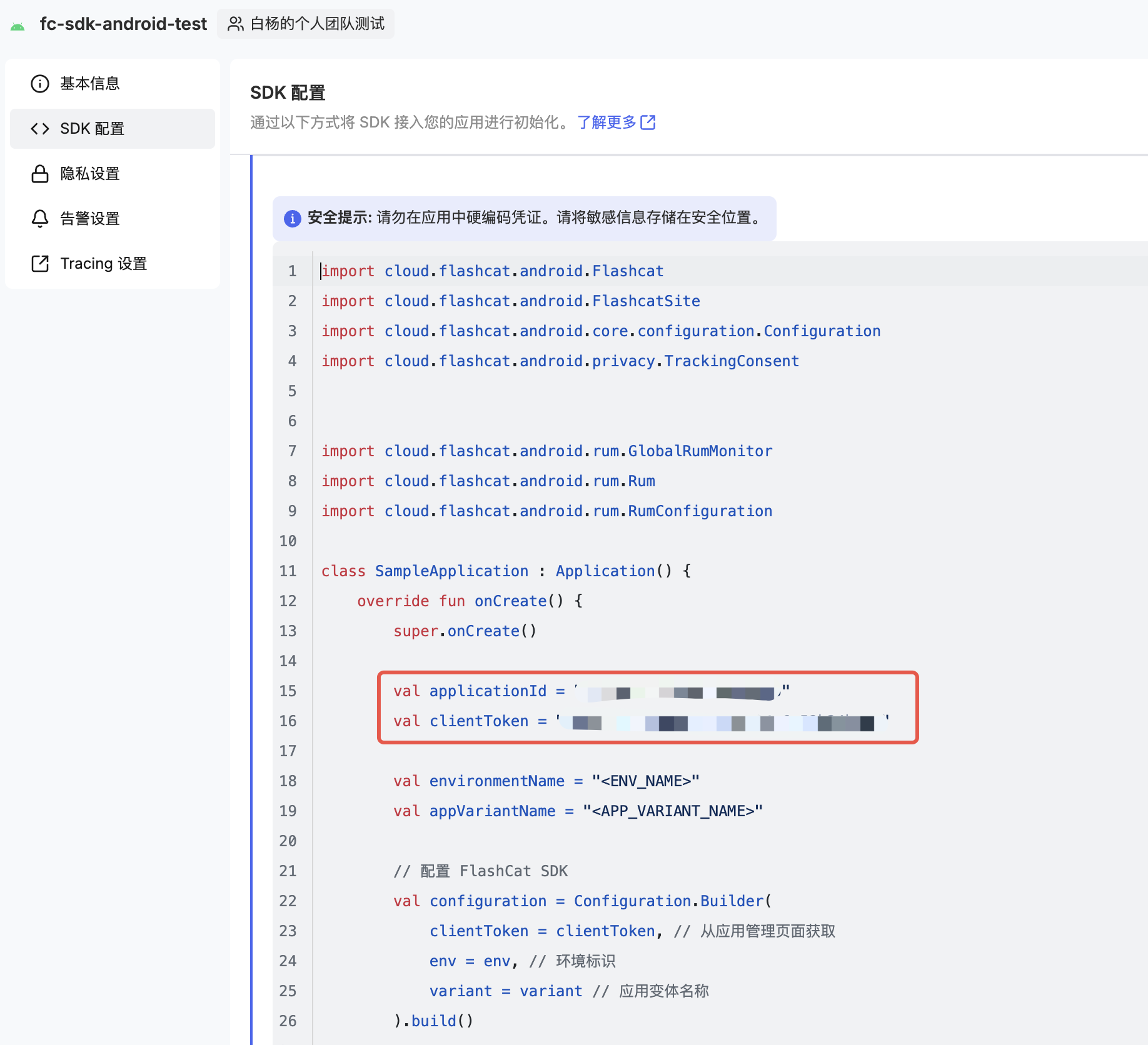
Step 2: Retrieve Application Information from the Console#

In the RUM Application Management page of the Flashcat console:
1.
Create or select an Android application
2.
Obtain the following information:
Application ID: Application unique identifier
Client Token: Client access token
2026-01-14-19-57-20

Step 3: Initialize SDK with Application Context#

Initialize the Flashcat SDK in the onCreate() method of your Application class:
During initialization, you need to set the environment name (environmentName) and app variant name (appVariantName). The appVariantName specifies which application variant generates the data. For more configuration options, see Advanced Configuration.

Step 4: Enable RUM Features and Start Sending Data#

Configure and enable the RUM features of the Android SDK:

Step 5: Initialize Interceptors to Track Network Events#

To initialize interceptors for tracking network events:
1.
Enable Trace Functionality: Add and enable the Trace feature
2.
Add Dependencies: Add the fc-sdk-android-okhttp library dependency to your module-level build.gradle file:
3.
Add Interceptor: Configure the interceptor provided by Flashcat to track OkHttp requests (currently using the community Datadog http interceptor).
4.
Automatically Create Resources and Spans: When using DatadogInterceptor as an interceptor, every request handled by OkHttpClient is automatically recorded as a resource, with related information (URL, method, status code, error) automatically populated. Note: Only network requests initiated when a view is active will be tracked. To track requests when the app is in the background, see Track Background Events.
5.
Track Network Redirects or Retries: To monitor network redirects or retries, you can use DatadogInterceptor as a network interceptor:
Note:
If using multiple interceptors, add DatadogInterceptor as the first interceptor
You can also add an EventListener to your OkHttpClient to automatically track resource timing for third-party providers and network requests.

Filter Specific Errors#

To filter specific errors reported by DatadogInterceptor, configure a custom EventMapper in the RumConfiguration:

Track Background Events#

You can track events that occur when the application is running in the background (such as crashes and network requests).
Add the following code during configuration:
Note: Tracking background events may generate additional sessions, which could affect billing. If you have questions, please contact the Flashcat support team.

Send Data When Device is Offline#

The Android SDK ensures data availability when the user's device is offline. In cases of weak network signals or low device battery, all events are first stored in batches on the local device.
Each batch follows the data intake specification. Batches are sent as soon as the network becomes available and the battery is sufficient, ensuring the Flashcat SDK doesn't affect the end-user experience. If the network is unavailable while the app is running in the foreground, or if data upload fails, the batch is retained until it is successfully sent.
This means that even if users open your app while offline, no data is lost. To ensure the SDK doesn't use too much disk space, old data on disk is automatically discarded.

Track Local Resource Access#

You can track access to assets resources using the getAssetAsRumResource extension method:
Track usage of raw resources using the getRawResAsRumResource extension method:

WebView Integration#

If your Android application includes WebView, you can enable WebView tracking in the following way:

Add WebView Dependencies#

Enable WebView Tracking#

Enable WebView tracking in your Activity or Fragment:
Parameter Description:
webView: The WebView instance to track
allowedHosts: List of allowed domains for tracking, supports wildcards
This way, web pages in your WebView can be associated with native app RUM data.

Verify Integration#

After integration is complete, you can verify successful integration through the following steps:
1.
Access Console: Log in to the console and navigate to the corresponding RUM application to check if data is being reported
2.
Trigger Test Events:
Open different pages of the app to verify page view events
Perform user operations (clicks, swipes, etc.) to verify interaction events
Trigger network requests to verify resource loading events
3.
Check Data Reporting Address: Check Logcat for network requests to the data reporting endpoint

Obfuscation Configuration#

If your application has code obfuscation enabled (ProGuard/R8), add the following rules to your proguard-rules.pro file:
# Flashcat SDK
-keep class cloud.flashcat.android.** { *; }
-dontwarn cloud.flashcat.android.**

Further Reading#

RUM Application Management: Learn how to create and manage RUM applications
Android SDK Advanced Configuration: Learn how to configure SDK advanced features
RUM Analysis Dashboard: View and analyze RUM data

添加官方技术支持微信

在这里,获得使用上的任何帮助,快速上手FlashDuty

微信扫码交流
修改于 2026-01-16 08:33:40
上一页
Data Collection
下一页
Advanced Configuration
Built with