Flashduty Docs
中文English
RoadmapAPI官网控制台
中文English
RoadmapAPI官网控制台
  1. Alert Rules
  • Introduction
  • On-call
    • Getting Started
      • Quick start
      • FAQ
      • Product Comparison
    • Incidents
      • What is an Incident
      • View Incidents
      • Handle Incidents
      • Escalations and Assignments
      • Custom Fields
      • Custom Actions
      • Alert Noise Reduction
      • Past Incidents
      • Outlier Incidents
      • Status Pages
    • Configure On-call
      • Channels
      • Integrate Alerts
      • Alert Noise Reduction
      • Escalation Rules
      • Label Enrichment
      • Schedules
      • Templates
      • Service Calendars
      • Preferences
      • Alert Routing
      • Silence and Inhibition
      • Filters
      • Notifications
      • Alert Pipeline
    • Advanced Features
      • Referencing Variables
      • Dynamic Assignment
      • Insights
      • War-room
    • Integrations
      • Alerts integration
        • Standard Alert Integration
        • Email Integration
        • Nightingale/FlashCat Integration
        • Prometheus Integration
        • Grafana Integration
        • Zabbix Integration
        • Uptime Kuma Integration
        • Alibaba Cloud ARMS Integration
        • Alibaba Cloud Monitor CM Event Integration
        • Alibaba Cloud Monitor CM Metrics Integration
        • Alibaba Cloud SLS Integration
        • AWS CloudWatch Integration
        • Azure Monitor Integration
        • Baidu Cloud BCM Integration
        • Huawei Cloud CES Integration
        • Influxdata Integration
        • Open Falcon Integration
        • PagerDuty Integration
        • Tencent BlueKing Integration
        • Tencent Cloud CLS Integration
        • Tencent Cloud Monitor CM Integration
        • Tencent Cloud EventBridge
        • OceanBase Integration
        • Graylog Integration
        • Skywalking Integration
        • Sentry Integration
        • Jiankongbao Integration
        • AWS EventBridge Integration
        • Dynatrace Integration
        • Huawei Cloud LTS Integration
        • GCP Integration
        • Splunk Alert Events Integration
        • AppDynamics Alert Integration
        • SolarWinds Alert Events Integration
        • Volcengine CM Alert Events Integration
        • Volcengine CM Event Center Integration
        • Volcengine TLS Integration
        • OpManager Integration
        • Meraki Integration
        • Keep Integration
        • ElastAlert2 Alert Integration
        • StateCloud Alert Events
        • Guance Alert Events
        • Zilliz Alert Events
        • Huawei Cloud APM Alerts
        • zstack integration
        • Monit Alert Integration
        • RUM Alert Integration
      • Change integration
        • Standard Change Event
        • Jira Issue Events
      • IM integration
        • Feishu (Lark) Integration Guide
        • Dingtalk Integration
        • WeCom Integration
        • Slack Integration
        • Microsoft Teams Integration
      • Single Sign-On
        • Authing Integration
        • Keycloak Guide
        • OpenLDAP Guide
      • Webhooks
        • Alert webhook
        • Incident webhook
        • Costom action
        • ServiceNow Sync
        • Jira Sync
      • Other
        • Link Integration
  • RUM
    • Getting Started
      • Introduction
      • Quick start
      • FAQ
    • Applications
      • Applications
      • SDK Integration
      • Advanced Configuration
      • Analysis Dashboard
    • Performance Monitoring
      • Overview
      • Metrics
      • Performance Analysis
      • Performance Optimize
    • Error Tracking
      • Overview
      • Error Reporting
      • Issues
      • Source Mapping
      • Error Grouping
      • Issue States
      • Issue Alerting
    • Session Explorer
      • Overview
      • Data Query
    • Session Replay
      • View Session Replay
      • Overview
      • SDK Configuration
      • Privacy Protection
    • Best Practice
      • Distributed Tracing
    • Others
      • Terminology
      • Data Collection
      • Data Security
  • Monitors
    • Getting Started
      • Introduction
      • Quick Start
    • Alert Rules
      • Prometheus
      • ElasticSearch
      • Loki
      • ClickHouse
      • MySQL
      • Oracle
      • PostgreSQL
      • Aliyun SLS
      • VictoriaLogs
    • FAQ
      • FAQ
  • Platform
    • Teams and Members
    • Permissions
    • Single Sign-On
  • Terms
    • Terms of Service
    • User Agreement/Privary Policy
    • SLA
    • Data Security
中文English
RoadmapAPI官网控制台
中文English
RoadmapAPI官网控制台
  1. Alert Rules

VictoriaLogs

This document describes how to configure VictoriaLogs data source alert rules in the Monitors alert engine. Monitors queries VictoriaLogs via HTTP, supporting raw log queries and statistical analysis, and performs threshold evaluation and data exists/missing detection based on the results.

1. Prerequisites#

1.1 How it works#

Monitors provides two query modes for VictoriaLogs data source alert rule configuration:
Raw query: Calls the /select/logsql/query endpoint. The returned data can be viewed as a two-dimensional table. In threshold mode, "label fields" and "value fields" need to be mapped.
Statistics: Calls the /select/logsql/stats_query endpoint. The returned data follows the Prometheus protocol format. Monitors automatically identifies which fields are labels and which are values, requiring no additional configuration.
VictoriaLogs data sources still support three alert modes. The data exists mode is most recommended as it is most suitable for log scenarios.

1.2 Raw query#

In "raw query" mode, the relevant configuration items are:
Query statement: Example: error | fields _time, _stream, _msg | sort by (_time) desc
Result limit: This configuration limits the maximum number of rows returned by a query to avoid performance impact from returning too much data in a single query. In Monitors, the maximum can be set to 100.
Time range: Specify the query time window, such as "last 5 minutes".
Label fields: Specify which fields in the query results serve as labels for the alert object, used to distinguish different alert entities. Multiple label fields can be configured. If left empty, Monitors will treat all fields except the value field as label fields.
Value field: Specify which field in the query results serves as the numeric value for threshold evaluation. This is usually a numeric type field. Required in threshold mode, optional in other modes.

1.3 Statistics#

In "statistics" mode, the stats keyword must be used. Relevant configuration items are:
Query statement: Example: _time:1d | stats by (level) count(*) total
No other parameters: Note that the query statement must include a _time filter condition, such as _time:5m, to limit the query time range. Otherwise, it queries all data, which may cause performance issues.

2. Threshold mode#

Both raw query and statistics query modes can be used. Examples are provided below.

2.1 Raw query example#

Query statement example:
level:ERROR | stats by (level) count(*) total
The result looks like:
leveltotal
ERROR150
Configure the value field as total and the label field as level (or leave unconfigured, and Monitors will automatically identify). Example configuration for different thresholds and levels:
Warning: $A.total >= 50 or simply $A >= 50 (since there's only one value field: total)
Critical: $A.total >= 100 or simply $A >= 100 (since there's only one value field: total)

2.2 Statistics example#

Query statement example:
_time:1d and level:ERROR | stats by (level) count(*) total
The result follows the Prometheus protocol format:
total{level="ERROR"} 150
Example configuration for different thresholds and levels:
Warning: $A.total >= 50 or simply $A >= 50 (since there's only one metric field: total)
Critical: $A.total >= 100 or simply $A >= 100 (since there's only one metric field: total)

2.3 Recovery logic#

Similar to Prometheus / ElasticSearch threshold mode, VictoriaLogs threshold mode supports:
Automatic recovery: When the latest query result shows that an object's value no longer meets any alert threshold, a recovery event is automatically generated.
Specific recovery condition: A recovery expression can be configured, such as $A.total < 10, to only consider recovery when the error count drops below 10, reducing flapping.
Recovery query: A separate VictoriaLogs query statement can be configured for recovery evaluation.
How it works: After an alert is triggered, Monitors periodically executes this recovery query statement. As long as the query returns data (i.e., the result is not empty), the incident is considered recovered.
Variable support: The recovery query statement supports embedded variables (format: ${label_name}), which are automatically replaced with the corresponding label values from the alert event, allowing the recovery query to detect specific alert objects.

3. Data exists mode#

This mode puts all filtering logic in the VictoriaLogs query, and Monitors only determines "whether data is returned". Suitable for "alert whenever there is data meeting the conditions" scenarios. This is the most recommended VictoriaLogs alert configuration method (because threshold mode requires data to be continuously available, with only the value changing, which is not suitable for log scenarios. Log scenarios are better suited for data exists mode).
Query statement example (using statistics query mode):
_time:15m and level:ERROR | stats by (level) count(*) total | filter total:>10
Here | filter total:>10 is used to filter data where total is greater than 10. As long as any data row meets this condition, Monitors will trigger an alert. If at some point no data row meets this condition, the alert is considered recovered.

4. No data mode#

No data mode is used to monitor situations where "logs that should be continuously generated no longer appear", commonly seen in:
Application instances no longer produce logs (possibly process exit).
Log collection pipeline anomalies (such as agent crash or output blocking).

4.1 Configuration example#

Query statement (statistics mode):
_time:15m and level:INFO | stats by (level) count(*) total
Scenario: A service should always have INFO log output. If there is no INFO log generated in the last 15 minutes, trigger an alert.

5. Get original logs when alerting#

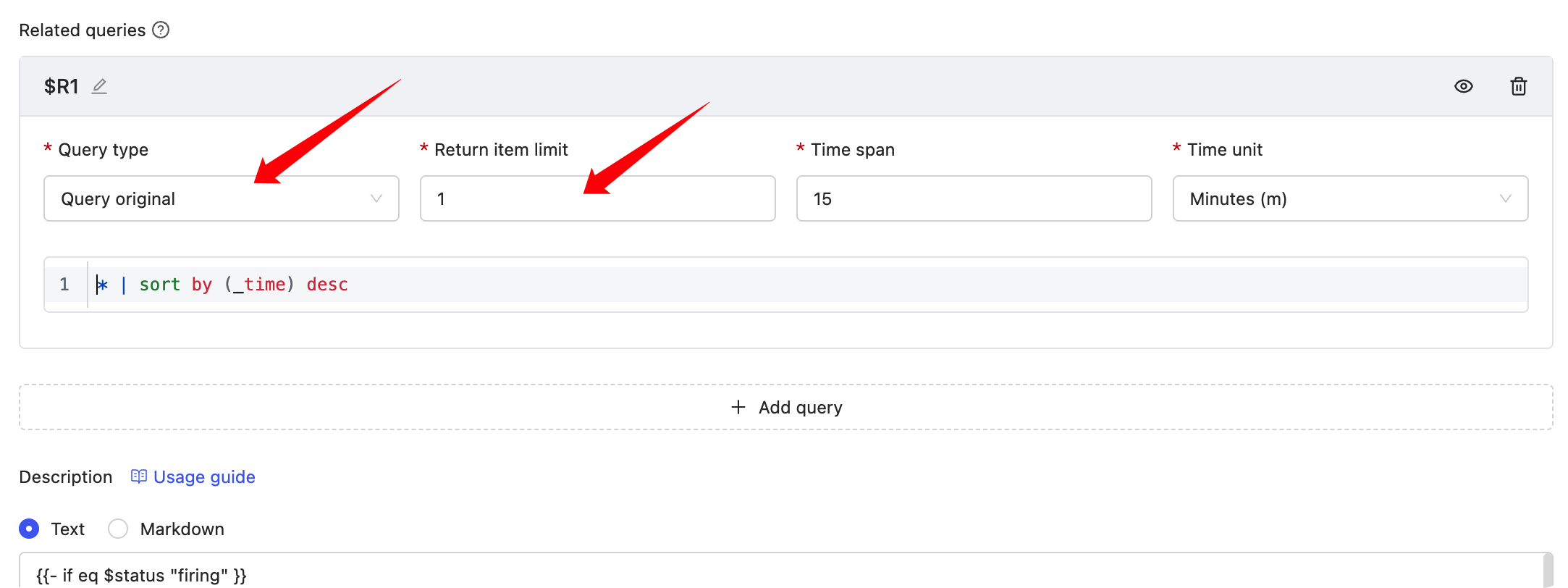
Alert query conditions typically use "statistics" mode, which does not return original logs. Monitors supports configuring "related queries" in alert rules to additionally query original logs when an alert is triggered.
The results of "related queries" can be rendered in the "Note description", example:
{{- if eq $status "firing" }}
triggered value: {{ $value | printf "%.3f" }}
{{- range $x := $relates.R1}}
{{- range $k, $v := $x.Fields }}
{{- if eq $k "_time" }}
{{ $k }} : {{ timeFormat $v "2006-01-02T15:04:05Z07:00" 8 }}
{{- else }}
{{ $k }} : {{ $v }}
{{- end }}
{{- end }}
{{- end}}
{{- else}}
Recovered
{{- end}}

添加官方技术支持微信

在这里,获得使用上的任何帮助,快速上手FlashDuty

微信扫码交流
修改于 2026-01-09 03:05:07
上一页
Aliyun SLS
下一页
FAQ
Built with