Flashduty Docs
中文English
RoadmapAPI官网控制台
中文English
RoadmapAPI官网控制台
  1. Getting Started
  • Introduction
  • On-call
    • Getting Started
      • Quick start
      • FAQ
      • Product Comparison
    • Incidents
      • What is an Incident
      • View Incidents
      • Handle Incidents
      • Escalations and Assignments
      • Custom Fields
      • Custom Actions
      • Alert Noise Reduction
      • Past Incidents
      • Outlier Incidents
      • Status Pages
    • Configure On-call
      • Channels
      • Integrate Alerts
      • Alert Noise Reduction
      • Escalation Rules
      • Label Enrichment
      • Schedules
      • Templates
      • Service Calendars
      • Preferences
      • Alert Routing
      • Silence and Inhibition
      • Filters
      • Notifications
      • Alert Pipeline
    • Advanced Features
      • Referencing Variables
      • Dynamic Assignment
      • Insights
      • War-room
    • Integrations
      • Alerts integration
        • Standard Alert Integration
        • Email Integration
        • Nightingale/FlashCat Integration
        • Prometheus Integration
        • Grafana Integration
        • Zabbix Integration
        • Uptime Kuma Integration
        • Alibaba Cloud ARMS Integration
        • Alibaba Cloud Monitor CM Event Integration
        • Alibaba Cloud Monitor CM Metrics Integration
        • Alibaba Cloud SLS Integration
        • AWS CloudWatch Integration
        • Azure Monitor Integration
        • Baidu Cloud BCM Integration
        • Huawei Cloud CES Integration
        • Influxdata Integration
        • Open Falcon Integration
        • PagerDuty Integration
        • Tencent BlueKing Integration
        • Tencent Cloud CLS Integration
        • Tencent Cloud Monitor CM Integration
        • Tencent Cloud EventBridge
        • OceanBase Integration
        • Graylog Integration
        • Skywalking Integration
        • Sentry Integration
        • Jiankongbao Integration
        • AWS EventBridge Integration
        • Dynatrace Integration
        • Huawei Cloud LTS Integration
        • GCP Integration
        • Splunk Alert Events Integration
        • AppDynamics Alert Integration
        • SolarWinds Alert Events Integration
        • Volcengine CM Alert Events Integration
        • Volcengine CM Event Center Integration
        • Volcengine TLS Integration
        • OpManager Integration
        • Meraki Integration
        • Keep Integration
        • ElastAlert2 Alert Integration
        • StateCloud Alert Events
        • Guance Alert Events
        • Zilliz Alert Events
        • Huawei Cloud APM Alerts
        • zstack integration
        • Monit Alert Integration
        • RUM Alert Integration
      • Change integration
        • Standard Change Event
        • Jira Issue Events
      • IM integration
        • Feishu (Lark) Integration Guide
        • Dingtalk Integration
        • WeCom Integration
        • Slack Integration
        • Microsoft Teams Integration
      • Single Sign-On
        • Authing Integration
        • Keycloak Guide
        • OpenLDAP Guide
      • Webhooks
        • Alert webhook
        • Incident webhook
        • Costom action
        • ServiceNow Sync
        • Jira Sync
      • Other
        • Link Integration
  • RUM
    • Getting Started
      • Application Management
      • Introduction
      • Quick Start
    • SDK Integration
      • Android
        • Data Collection
        • SDK Integration
        • Advanced Configuration
        • Compatibility
      • iOS
        • Data Collection
        • Compatibility
        • SDK Integration
        • Advanced Configuration
      • Web
        • Data Collection
        • SDK Integration
        • FAQ
        • Advanced Configuration
        • Compatibility
    • Session Explorer
      • Overview
      • Data Query
    • Analysis Dashboard
      • Web
      • Native
    • Performance Monitoring
      • Metrics
      • Performance Optimize
      • Overview
      • Performance Analysis
    • Error Tracking
      • Issues
      • Error Grouping
      • Source Mapping
      • Overview
      • Issue Status
      • Issue Alerting
      • Error Reporting
        • iOS
        • Android
        • Web
    • Best Practice
      • Distributed Tracing
    • Session Replay
      • View Session Replay
      • SDK Configuration
      • Overview
      • Privacy Protection
    • Others
      • Data Collection
      • Terminology
      • Data Security
  • Monitors
    • Getting Started
      • Introduction
      • Quick Start
    • Alert Rules
      • Prometheus
      • ElasticSearch
      • Loki
      • ClickHouse
      • MySQL
      • Oracle
      • PostgreSQL
      • Aliyun SLS
      • VictoriaLogs
    • FAQ
      • FAQ
  • Platform
    • Teams and Members
    • Permissions
    • Single Sign-On
  • Terms
    • Terms of Service
    • User Agreement/Privary Policy
    • SLA
    • Data Security
中文English
RoadmapAPI官网控制台
中文English
RoadmapAPI官网控制台
  1. Getting Started

Application Management

A RUM application is a container for frontend performance monitoring data, used to collect, store, and analyze real user experience data in frontend applications. An application represents a monitored frontend project, which can be a website, mobile application, or single-page application.
We recommend creating RUM applications based on business systems or applications, such as: official website, e-commerce platform, admin dashboard, etc.
Each application has its own applicationId and clientToken to identify data sources and ensure data security. After creating an application, you need to integrate the SDK into your frontend code to begin data collection and monitoring.

Application Permissions#

To meet special business requirements, RUM applications provide flexible permission management options (access levels), ensuring information is only visible to certain members or teams. Here are the two main permission settings:
Public: The application is visible to all users. All users can view the data collected by this application and handle issues under this application.
Private: Only the application creator, account administrators (Account Admin), and the owner account can view the data collected by this application. Other members who need to view the content can do so through shared incident links.

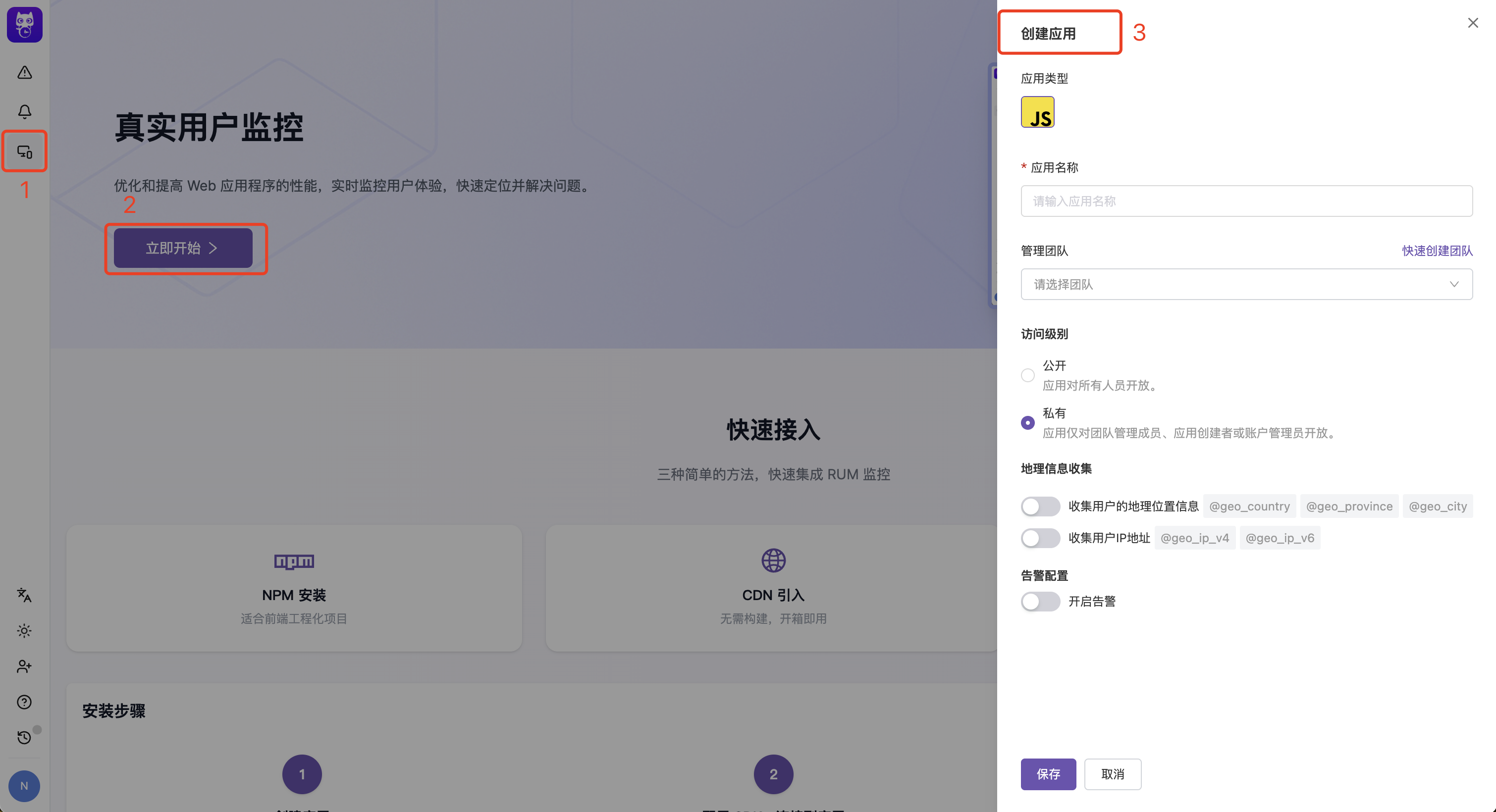
Creating an Application#

2025-05-15-16-04-14
You can quickly create an application through the RUM product guidance page
Application Type: Choose the frontend technology type for your application. Currently supports JavaScript (JS), Android, and iOS.
Management Team: Set the management team for the application. Team members have full operational permissions for the application, while non-creators have read-only access to the application's configuration.
Geographic Information: By default, automatic user data collection is enabled. If you need to disable automatic user data collection for client IP or geographic location data, turn off the geographic information collection switch. For details, see RUM Browser Data Collection.
Alert Configuration: By default, alert notifications are automatically enabled to help you promptly handle errors. For details, see Issue Alerting

SDK Configuration#


You can modify parameters in the application configuration-SDK configuration to preview the SDK initialization code in real-time, allowing you to quickly integrate the SDK. For more configuration instructions, see Initialization Parameters
提示
Modifying SDK configuration in application management will not take effect in real-time on already integrated clients. All configuration changes need to be updated in your frontend code and redeployed to take effect. This means that when you adjust parameters such as sampling rate, service name, etc., you need to correspondingly update the SDK initialization parameters in your frontend code and redeploy the application.

How to Define Services?#

A service is an independent, deployable code repository that maps to a set of pages.
If your application is built as a whole, then your RUM application has one service name for that application.
If your browser application is built as separate repositories for multiple pages, edit the default service name throughout the lifecycle of your application.
You can modify parameters in the application configuration-SDK configuration to preview the SDK initialization code in real-time, allowing you to quickly integrate the SDK. For more configuration instructions, see Initialization Parameters

Next Steps#

RUM SDK Integration Guide: Learn how to integrate the RUM SDK
RUM SDK Advanced Configuration: Learn how to configure advanced features of the SDK
RUM Analysis Dashboard: View and analyze RUM data

添加官方技术支持微信

在这里,获得使用上的任何帮助,快速上手FlashDuty

微信扫码交流
修改于 2026-01-16 08:23:22
上一页
Link Integration
下一页
Introduction
Built with